Web Chat separates the person visiting the website from the session used to maintain their Web Chat state and the Guest identity associated with their conversations. Understanding these relationships helps you manage anonymous visitors, identify returning users, and maintain conversation continuity across page navigation.
Identity Model
Visitor
A Visitor is a person interacting with Web Chat on your website.
A Visitor can begin interacting with Web Chat before an identified Guest profile is established. The visitor’s browser provides the context used to maintain the Web Chat session.
Visitor Session
A Visitor Session is the signed session used to maintain a visitor’s Web Chat state.
The session is associated with the Web Chat Workspace and Channel and is persisted in browser storage so the visitor can continue using Web Chat across page reloads and same-site navigation.
Visitor Sessions have a default validity period of 7 days.
Guest
A Guest is the persistent visitor identity used by YS Desk for Web Chat conversations.
Guest identity can be established through the Web Chat identity form or by providing identity information through the SDK.
Guest records are associated with a Workspace and can contain information such as the visitor’s name and email address.
Conversation Relationship
A Conversation represents the visitor’s communication thread with the support team.
A Guest can have multiple historical conversations over time. While an active conversation remains open, Web Chat can reuse that conversation when the visitor returns to the site with the same session and identity context.
Visitor Session Lifecycle
Session Creation
When Web Chat initializes, it checks whether a valid visitor session already exists.
If a valid session is available, Web Chat reuses it. When no valid session exists, Web Chat establishes a new visitor session as part of the visitor identity and conversation flow.
Session Persistence
Visitor session information is stored in browser local storage.
This allows Web Chat to restore the visitor’s state after a page reload and continue the same Web Chat experience across pages under the same website origin.
Session Expiration
Web Chat also applies a separate client-side inactivity rule for conversation state. When the stored conversation has been inactive for 5 days or more, Web Chat clears the relevant local conversation state and returns the visitor to a clean starting state.
These are separate mechanisms: the 7-day period applies to the signed Visitor Session, while the 5-day inactivity rule controls client-side conversation state cleanup.
If a Visitor Session expires or becomes invalid, Web Chat can establish a fresh session when the visitor continues interacting with the channel.
Session Recovery
When a valid session is available, Web Chat rehydrates the visitor’s stored identity and conversation context instead of starting the visitor experience from scratch.
Session recovery allows visitors to return to an existing Web Chat experience without manually restoring their previous state.
Guest Identity
Anonymous Visitors
A visitor can initially interact with Web Chat without supplying identity information through the SDK.
Once identity information is collected or supplied, YS Desk can associate the visitor with a persistent Guest identity.
An anonymous visitor can open and interact with Web Chat before a persistent Guest profile is established. The Guest and Conversation records are created on demand when the visitor submits the first message or when identity is explicitly supplied through a supported SDK or support-session flow.
Pre-Chat Identity Capture
In standard Web Chat mode, the initial identity form collects:
Name
Email
Message
In standard Web Chat mode, Name, Email, and Message are required before the first message can be submitted.
The visitor submits this information before the first message is sent through the pre-chat flow.
Name is limited to 30 characters, Email is limited to 100 characters, and Message is limited to 5000 characters.
The pre-chat greeting displayed above the form can be configured through the Web Chat configuration settings.
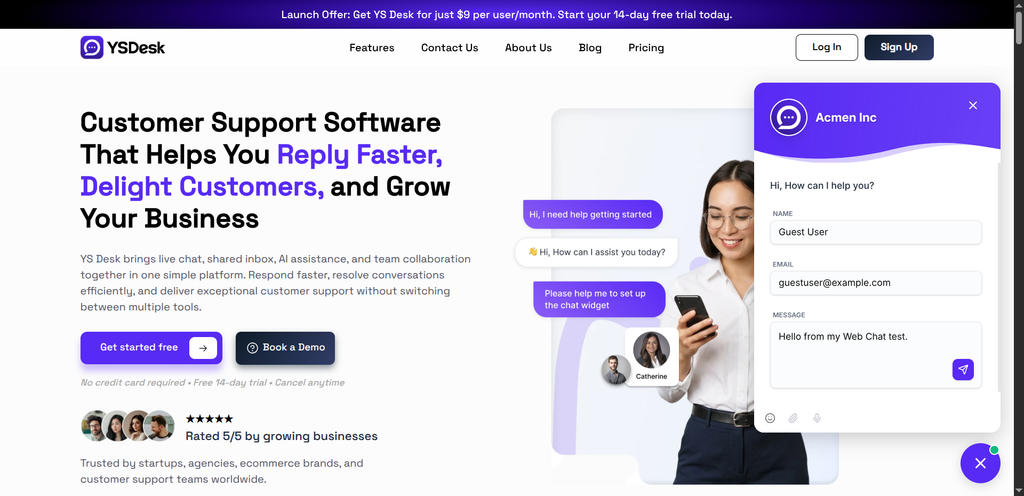
Figure WC-18 — The Web Chat pre-chat identity form collecting visitor name, email, and initial message.
SDK-Provided Identity
Known visitor information can be provided when Web Chat is initialized:
window.YSDeskSDK(‘run’, {
token: ‘YOUR_CHANNEL_TOKEN’,
userEmail: ‘alex.morgan@example.com’,
userName: ‘Alex Morgan’
});
The userEmail and userName values allow Web Chat to initialize the visitor with known identity information.
Identity Updates and Deduplication
When a visitor provides an email address that matches an existing Guest in the same Workspace, YS Desk can associate the visitor with that existing Guest rather than maintaining a separate duplicate identity.
This allows existing conversation history and visitor information to remain associated with the established Guest profile.
SDK Identity Controls
userEmail and userName
The Web Chat SDK accepts userEmail and userName during initialization with window.YSDeskSDK(‘run’, { … }).
The Web Chat SDK does not expose a standalone window.YSDeskSDK.identify() method. Visitor identity is established through the Web Chat pre-chat form, SDK-provided userEmail and userName, or a support session.
Embedded Application Mode
embeddedApp can be enabled when Web Chat is embedded inside an application where the visitor is already authenticated by the host application.
In this mode, the standard Name and Email fields are hidden and the visitor can interact with the message interface using the identity supplied by the host application.
window.YSDeskSDK(‘run’, {
token: ‘YOUR_CHANNEL_TOKEN’,
userEmail: ‘alex.morgan@example.com’,
embeddedApp: true
});
Support Sessions
A support session allows a host application to open Web Chat with an existing Guest and Conversation context.
This is useful when the host application already knows which Guest and Conversation should be displayed. Web Chat can restore the supplied support context without requiring the standard pre-chat identity capture flow.
For the complete supportSession configuration, supported fields, and SDK method details, see [Web Chat → SDK Reference].
Browser and Session Behavior
Page Reloads and Navigation
Visitor session and Guest state stored in browser storage can be restored after a page reload.
The same state can also continue across normal navigation between pages on the same website origin.
Multiple Tabs
Pages using the same website origin can access the same browser storage and therefore share the stored visitor identity and conversation context.
Each tab can still maintain its own real-time connection to Web Chat.
Browser and Private Browsing Behavior
Browser storage behavior depends on the browser and its privacy settings.
Where persistent browser storage is unavailable, Web Chat can use an in-memory session during the active browsing context. That state does not provide the same persistence guarantees as local storage.
Identity and conversation continuity should therefore not be treated as permanent browser-level authentication.
Host Page Context
Page URL and Title
Web Chat can synchronize host-page context such as the current page URL and document title.
This allows the support workspace to receive context about the page where the visitor is interacting with Web Chat.
Navigation Context
Host-page navigation can update the synchronized page context during normal website navigation and supported single-page application route changes.
This context is separate from the Visitor Session and Guest identity itself.
Session Reset and SDK Teardown
window.YSDeskSDK.destroy() removes the Web Chat interface and launcher from the host page.
Destroying the SDK does not itself delete the Guest identity or clear the visitor’s stored session state.
Start New Conversation
Starting a new conversation resets the current Web Chat conversation state for the channel and returns the visitor to the initial pre-chat flow.
The current conversation and associated channel-specific Guest and pre-chat state are cleared so the visitor can begin a new conversation.
SDK Teardown
Calling window.YSDeskSDK.destroy() removes the Web Chat interface and launcher from the host page and resets the SDK’s in-memory state.
destroy() does not clear the browser’s persisted Web Chat storage and does not log the visitor out.
Start New Conversation resets the active conversation context, while destroy() tears down the Web Chat UI and launcher.
For complete SDK lifecycle behavior, see [Web Chat → SDK Reference].
Security and Privacy
Visitor Sessions are cryptographically signed using HMAC-SHA256 and include an expiration time.
The session is scoped to the Web Chat Workspace and Channel and is validated before protected visitor operations are allowed.
Do not expose private application credentials, signing secrets, workspace authentication credentials, or backend secrets in Web Chat client-side configuration.
Guest identity information should also be handled according to your application’s privacy and data-handling requirements.
Need Help?
Email: support@ysdesk.com
Documentation: https://docs.ysplugins.com/ys-desk