Reconnection & Failure Handling
YS Desk clients are designed to recover automatically from temporary network interruptions. Recovery combines Socket.IO reconnection with incremental REST synchronization so that a client can restore the state it missed while disconnected.
Connection Lifecycle & Backoff
Both dashboard and Web Chat clients use automatic reconnection.
The verified configuration includes:
reconnection: true
reconnectionAttempts: Infinity
initial delay: 1 second
maximum delay: 5–10 seconds
connection timeout: 20 seconds
jitter: enabled
The exact maximum delay differs between the dashboard and widget client configurations.
Applications should therefore treat temporary disconnect states as recoverable unless the server communicates a terminal condition.
Recovery Pipeline
When a connection is lost:
- Socket.IO begins automatic reconnection using exponential backoff and jitter.
- The client reconnects to the Socket.IO gateway.
- The client reconciles message state through the incremental REST synchronization API.
- The client re-subscribes to required conversation rooms.
- The client restores any required active conversation state.
- Pending outbound messages are flushed when the connection is available.
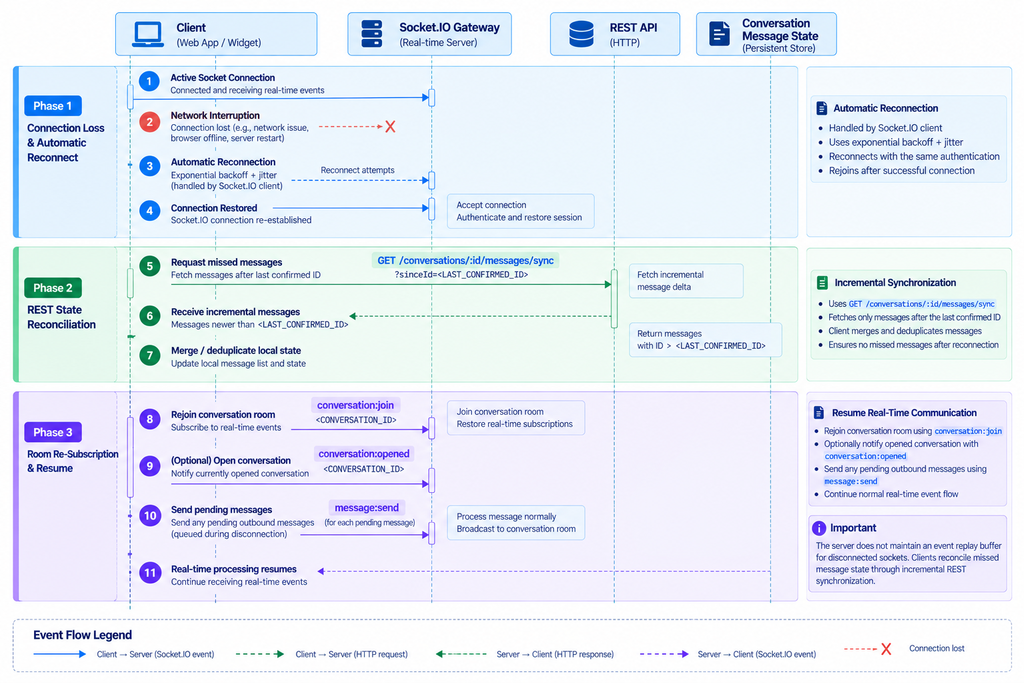
Figure RT-06 — Reconnection and incremental REST synchronization flow.
Incremental Message Synchronization
YS Desk does not rely on a server-side replay buffer for every disconnected socket.
Instead, clients use:
GET /conversations/:id/messages/sync?sinceId=<LAST_CONFIRMED_ID>
or an equivalent timestamp-based synchronization request.
The client merges the returned message delta into its local state before resuming normal real-time subscriptions.
Example:
const response = await fetch(
`/conversations/${conversationId}/messages/sync?sinceId=${lastConfirmedMessageId}`,
{
headers: {
Authorization: `Bearer ${accessToken}`,
},
}
);
const { messages } = await response.json();
mergeMessages(messages);
The REST endpoint is the canonical synchronization mechanism after a real-time interruption.
Room Re-Subscription
After successful reconnection, clients rejoin the conversation scopes required for the active UI state.
For example:
socket.emit(“conversation:join”, {
conversationId,
});
A visible conversation may also send:
socket.emit(“conversation:opened”, {
conversationId,
userId,
});
Preventing Duplicate State
Reconciliation must be idempotent.
When synchronization returns events or messages that overlap with local state, the client should merge them without creating duplicates. Message identifiers and client message identifiers provide the information needed for this reconciliation process.
Token Expiration and Authentication Recovery
A reconnect can require valid authentication context again.
Applications using Auth0 should ensure that the access token supplied to the socket remains valid and that a refreshed token is available when a reconnect occurs.
Web Chat Visitor clients should likewise preserve the valid Visitor Session context required by the real-time connection.
Authentication state should be refreshed before repeatedly retrying a connection that is failing because its credentials are no longer valid.
Idle and Forced Session Closure
Agent sessions may be force-closed after inactivity or administrative termination.
The public event is:
session:force-closed
with a payload containing a reason such as:
{
“reason”: “idle_timeout”
}
Applications should treat this as a terminal session condition rather than a normal transient network interruption.
Workspace Pending Deletion
When a Workspace enters the pending-deletion state, the server may forcibly terminate active connections.
The associated public event is:
workspace:pending-deletion
with:
{
“workspaceId”: “<WORKSPACE_ID>”,
“pendingDeletion”: true,
“errorCode”: “WORKSPACE_PENDING_DELETION”
}
The Web Chat client explicitly stops its normal reconnection behavior for this terminal Workspace condition.
Failure Handling Rules
Applications should distinguish three classes of failure:
Transient connection failure
Allow Socket.IO to reconnect automatically.
Recoverable state gap
Reconnect successfully, then synchronize missed messages through REST.
Terminal authorization or Workspace state
Stop treating the connection as recoverable until valid credentials or Workspace state has been restored.
Need Help?
Email: support@ysdesk.com
Documentation: https://docs.ysplugins.com/ys-desk