Configure the automated messaging options available for the Website channel during onboarding.
This step allows you to configure the Welcome message and Offline message for your Web Chat experience. Other automation options are displayed as coming soon and are not currently configurable during onboarding.
Configure Automation
The automation setup screen provides options for controlling automated messages shown to visitors.
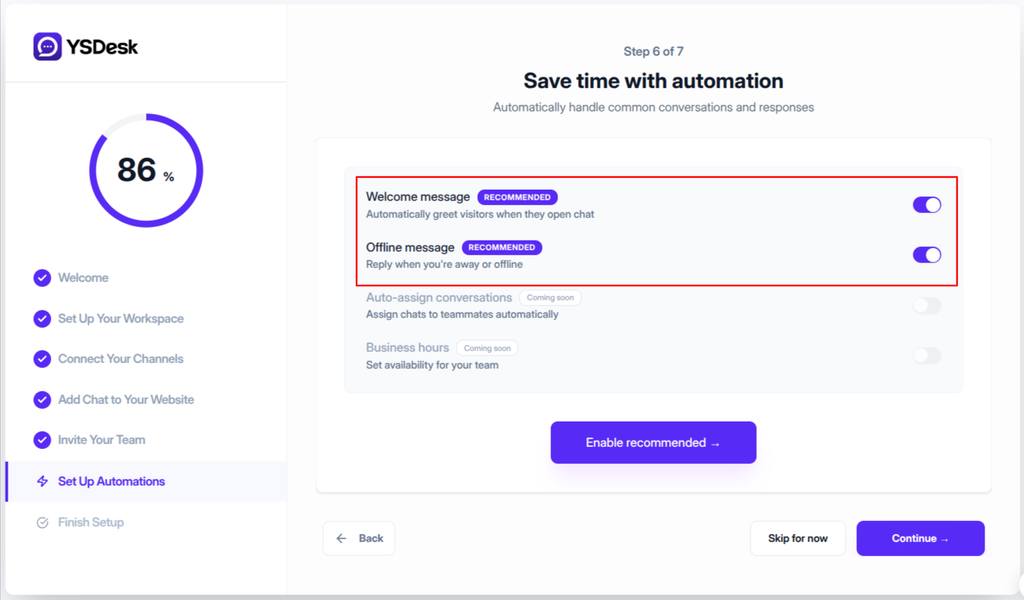
Figure ONB-06 — YS Desk onboarding Step 6 showing the available automation settings, including Welcome message, Offline message, and upcoming automation options.
Welcome Message
The Welcome message is enabled by default.
On supported paid plans, the setting can be enabled or disabled during onboarding.
On the Free plan, the Welcome message remains enabled and the control is locked. The interface displays an Always On indicator, while customization requires the Starter plan.
Offline Message
The Offline message controls the message shown to visitors when support is unavailable.
This option is available based on the workspace subscription plan. The current implementation requires the Starter plan or higher to use the Offline message during onboarding.
Auto-Assign Conversations
Coming soon
Automatic conversation assignment is displayed as an upcoming feature and is not currently configurable during onboarding.
Business Hours
Coming soon
Business-hours automation is displayed as an upcoming feature and is not currently configurable during onboarding.
Continue Setup
After configuring the available automation options, continue to the next onboarding step.
Depending on the current state of the configuration, the primary action is displayed as:
Enable recommended →
or
Continue →
The onboarding wizard then advances to Step 7 — Completion & Inbox Handoff.
Expected Result
After completing this step:
- The selected Welcome message setting is saved.
- The selected Offline message setting is saved when the feature is available for the workspace.
- The onboarding wizard advances to Step 7 — Completion & Inbox Handoff.
- The configured automation settings are applied to the Web Chat channel.
Need Help?
Email: support@ysdesk.com
Documentation: https://docs.ysplugins.com/ys-desk