Begin workspace onboarding by selecting the primary objective for your YS Desk workspace.
The first step introduces the onboarding process and lets you choose the support experience you want to configure. The current onboarding flow presents Live Chat as the available objective, while other options are shown as coming soon.
Welcome to YS Desk
The onboarding wizard starts with a welcome screen that guides you through the workspace setup process.
At the top of the page, the onboarding interface shows the current progress and the total number of onboarding steps.
Step 1 of 7
The onboarding progress indicator and step navigation show where you are in the setup process.
Select Your Objective
YS Desk currently presents four objective options:
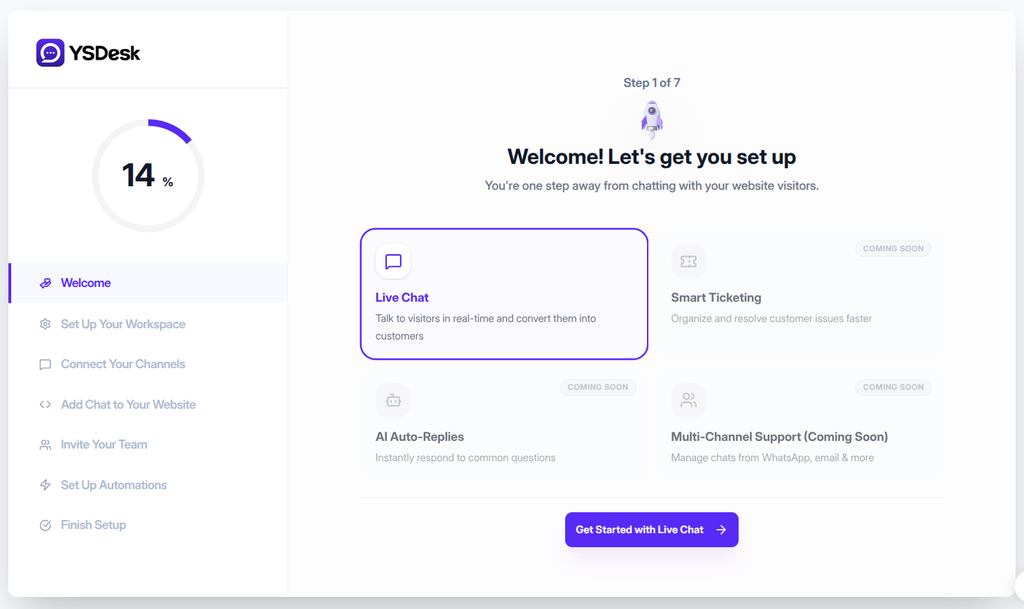
Figure ONB-01 — YS Desk onboarding Step 1 showing the welcome screen and available workspace objectives, with Live Chat selected.
Live Chat
Select Live Chat to configure YS Desk for customer conversations through Web Chat.
This is the currently available onboarding objective and is selected by default in the initial onboarding state.
Smart Ticketing
Coming soon
This objective is displayed as an upcoming option and is not currently available for onboarding.
AI Auto-Replies
Coming soon
This objective is displayed as an upcoming option and is not currently available for onboarding.
Multi-Channel Support
Coming soon
This objective is displayed as an upcoming option and is not currently available for onboarding.
Continue with Live Chat
With Live Chat selected, continue by selecting:
Get Started with Live Chat →
This advances the onboarding process to Step 2 — Workspace Setup & Domain Configuration.
Onboarding Progress
The onboarding wizard keeps the seven-step process visible so you can see the current position and remaining setup stages.
1. Welcome
2. Set Up Your Workspace
3. Connect Your Channels
4. Add Chat to Your Website
5. Invite Your Team
6. Set Up Automations
7. Finish Setup
On Step 1, the progress indicator represents the first stage of the seven-step onboarding process.
Expected Result
After continuing with Live Chat:
- The selected objective remains Live Chat.
- The onboarding wizard advances to Step 2.
- The workspace setup and domain configuration stage becomes available.
Need Help?
Email: support@ysdesk.com
Documentation: https://docs.ysplugins.com/ys-desk