Saved Replies let Agents reuse frequently sent responses without repeatedly typing the same message.
Manage Saved Replies
Open:
Settings → Quick / Saved Replies → Response Templates
The Quick / Saved Replies section provides three management areas:
- Response Templates: Create, edit, and organize Saved Reply templates.
- Categories: Manage Saved Reply categories. This requires the Growth plan.
- Shortcuts: View the available Saved Reply shortcuts.
Create a Saved Reply
Select Create Template from the top toolbar or empty state.
Define the available Saved Reply information, including:
- Title
- Shortcut
- Category
- Visibility
- Message content
Use the supported visibility values:
PUBLIC
PRIVATE
Use a Shortcut
Saved Reply shortcuts use the / character.
Example:
/welcome
Type / in the message composer to open matching Saved Replies.
Select the appropriate result or confirm the highlighted item to insert it into the composer.
Browse Saved Replies
Use the Saved Reply control in the composer to browse available templates.
Saved Replies can be organized by category when category management is available.
Manage Categories & Shortcuts
Under Settings → Quick / Saved Replies:
- Categories: Create and manage categories for Saved Reply templates.
- Shortcuts: View the available /shortcut commands for Saved Replies.
Plan Availability
The current plan configuration identified by the audit is:
| Plan | Saved Replies |
| Free | Up to 10 |
| Starter | Up to 50 |
| Growth | Unlimited |
Saved Reply category management requires the Growth plan.
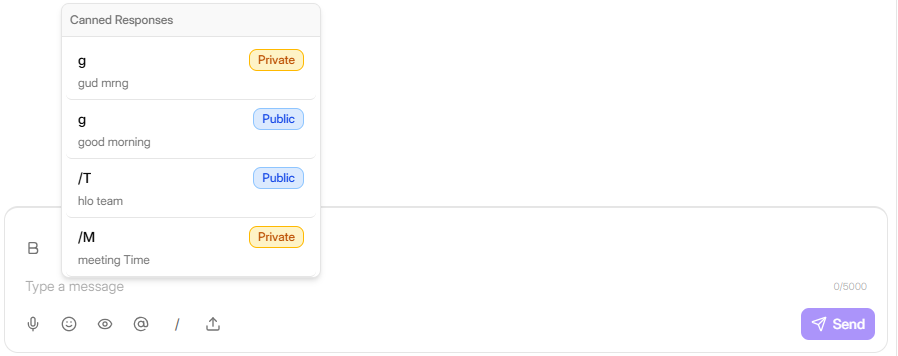
Figure G-12 Response Templates page and Saved Reply shortcut popover
Need Help?
Email: support@ysdesk.com
Documentation: https://docs.ysplugins.com/ys-desk