YS Desk uses separate authentication mechanisms for workspace users, Web Chat visitors, channels, and real-time connections. Authentication establishes the identity or session associated with a request, while authorization determines whether that identity can access a workspace or perform a specific operation.
The platform separates these concerns to protect workspace boundaries and support both authenticated workspace users and anonymous Web Chat visitors.
Authentication Architecture
The main authentication paths are:
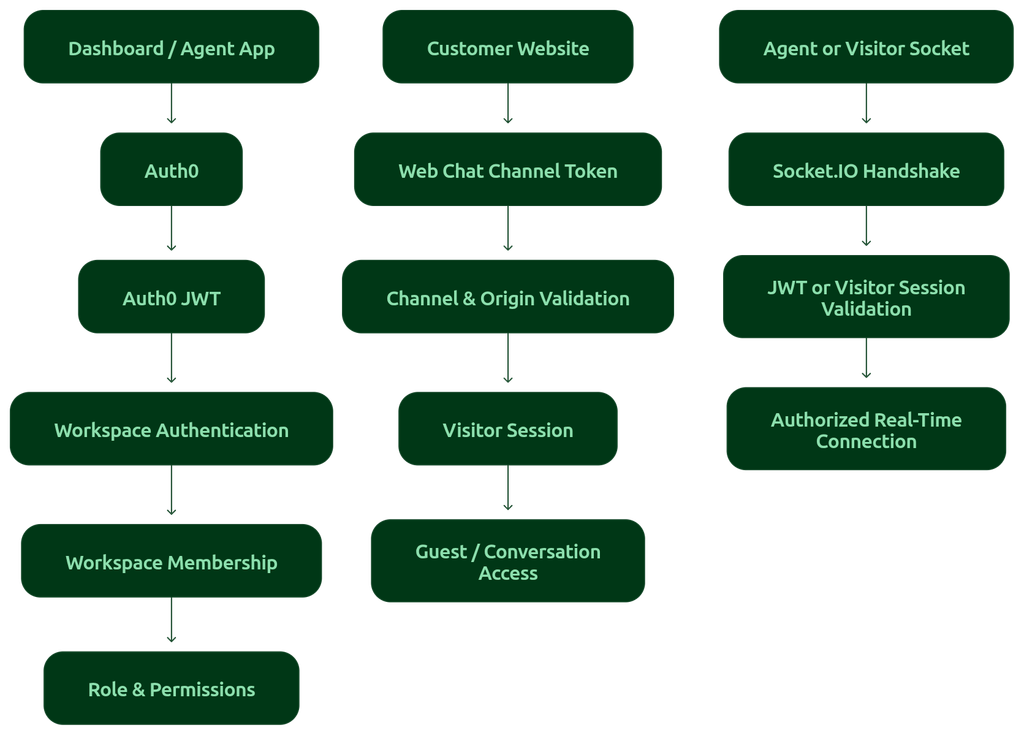
Figure AUTH-01 — High-level YS Desk authentication architecture showing Workspace Agent, Web Chat Visitor, and Real-Time connection paths.
The three primary client-facing credential types are:
| Credential | Used By | Purpose |
| Auth0 JWT | Workspace Owners, Admins, and Agents | Authenticates workspace users |
| Channel Token | Web Chat clients | Identifies the Web Chat channel and validates the website origin |
| Visitor Session | Web Chat visitors | Maintains an authenticated visitor session after Web Chat initialization |
Webhook signature verification is used separately for supported payment-provider callbacks.
Dashboard & Agent Authentication
Workspace users authenticate through Auth0 OpenID Connect (OIDC).
After authentication, the YS Desk backend validates the Auth0-issued JWT using the Auth0 public signing keys.
The application uses RS256 signature validation and verifies the token’s issuer, audience, signature, and expiration before processing protected workspace operations.
The client presents the access token using the standard Bearer authorization scheme.
Authorization: Bearer <JWT>
Workspace context is supplied separately so that the authenticated user can operate within the intended workspace.
x-workspace-id: <workspace-id>
The JWT establishes who the user is. The workspace context establishes which workspace the request is targeting.
JWT Identity Claims
YS Desk consumes relevant claims from the Auth0 token to establish and validate user identity.
JWT
├── iss → Issuer
├── sub → Authenticated user identifier
├── aud → Intended audience
├── iat → Issued-at timestamp
├── exp → Expiration timestamp
├── scope → Granted authentication scopes
└── azp → Authorized party
The sub claim is used to associate the authenticated Auth0 identity with the corresponding YS Desk user.
The exp claim determines whether the token is still valid.
The issuer and audience values help ensure that the token was issued for the expected identity provider and application.
Workspace Context & Authorization
Authentication and workspace authorization are separate stages.
A valid user token does not by itself grant access to every workspace.
YS Desk resolves the requested workspace and verifies that the authenticated user has an active membership in it.
The resulting authorization context includes the user’s effective workspace role and permissions.
Dashboard Client
↓
Present Authenticated JWT
↓
Authentication Layer
↓
Validate Identity & Token
↓
Resolve Requested Workspace
↓
Verify Active Membership
↓
Workspace + Effective Role
↓
Build Authorization Context
↓
Allow Authorized Operation
Workspace Membership
The authenticated user must have an active membership in the requested workspace.
YS Desk also checks relevant workspace and membership state before allowing access.
Requests can be rejected when:
- The JWT is invalid or expired.
- The user cannot be resolved from the authenticated identity.
- The user is not an active member of the requested workspace.
- The user’s workspace membership is blocked.
- The workspace is inactive or unavailable.
Roles & Permissions
After workspace membership is established, YS Desk determines the user’s effective role.
Current workspace roles are:
OWNER
ADMIN
AGENT
Role checks provide broad authorization boundaries, while granular permissions provide more specific control over workspace operations.
This produces the following authorization chain:
Authenticated Identity
↓
Workspace Context
↓
Workspace Membership
↓
Effective Role
↓
Granular Permissions
↓
Authorized Operation
Detailed permission keys and authorization rules belong under:
[REST API → Authorization & Permissions]
[Guides → Permissions]
[Reference → Permission Templates]
Authentication vs Authorization
These concepts should be treated separately:
| Authentication | Authorization |
| Verifies identity or session | Determines allowed access |
| Validates credentials or tokens | Evaluates membership, role, and permissions |
| Answers “Who are you?” | Answers “What can you access or do?” |
| Examples: Auth0 JWT, Visitor Session | Examples: workspace membership, role, granular permission |
This separation is fundamental to YS Desk’s workspace isolation model.
Visitor & Guest Authentication
Web Chat visitors do not authenticate through the dashboard’s Auth0 flow.
Instead, YS Desk establishes a Visitor Session for the visitor.
Visitor sessions are signed using HMAC-SHA256 and contain claims that bind the session to the appropriate workspace and channel.
A visitor session can contain:
Visitor Session
├── workspaceId
├── channelId
├── guestId
├── conversationId
├── iat
└── exp
guestId and conversationId are optional depending on the visitor’s current state.
Session Integrity
The session contains a cryptographic signature that allows the server to detect tampering.
Conceptually:
Visitor Session
↓
Claims
↓
HMAC-SHA256 Signature
↓
Signed Session Envelope
↓
Server Verification
The server verifies the signature and expiration before allowing protected visitor operations.
Invalid or expired visitor sessions are rejected.
Visitor Session Lifetime
The current implementation uses a default visitor-session lifetime of 5 days.
The session contains an issued-at timestamp and an expiration timestamp so the server can determine whether it is still valid.
Channel Tokens & Domain Validation
The Channel Token identifies the Web Chat channel that is being initialized.
It is intended to be embedded in the Web Chat installation configuration and is therefore different from the authenticated JWT used by workspace users.
A Channel Token identifies the channel entry point; it does not by itself grant access to private workspace conversations or customer data.
Before accepting a channel initialization, YS Desk verifies:
- The channel exists.
- The channel is active.
- The parent workspace is active.
- The requesting website origin is permitted.
The origin is compared against the domains associated with the workspace.
Customer Website
↓
Initialize Web Chat with Channel Token
↓
Channel Validation
↓
Verify Channel Exists and Is Active
↓
Validate Website Origin
↓
Origin Allowed
↓
Establish Visitor Session
↓
Signed Visitor Session
↓
Web Chat
↓
Use Session for Visitor Access
This creates a boundary between:
Channel identification
and
Visitor authentication.
The Channel Token identifies the Web Chat entry point, while the Visitor Session represents the authenticated visitor session.
Real-Time Authentication
YS Desk uses Socket.IO for real-time communication.
Real-time connections authenticate during the connection handshake.
Both workspace users and Web Chat visitors can establish authenticated real-time connections, but they use different credentials.
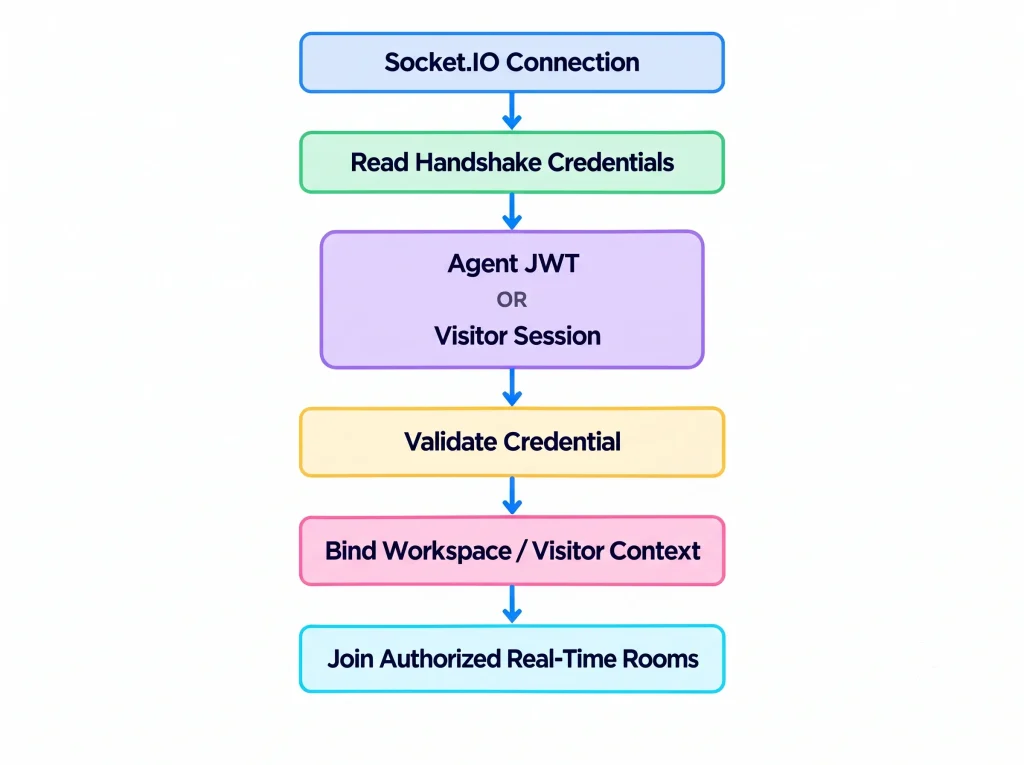
For workspace users, the connection is associated with the authenticated user and active workspace.
For Web Chat visitors, the connection is associated with the visitor session, channel, workspace, and guest context.
Detailed connection behavior, namespaces, room handling, events, and reconnection behavior are documented separately under:
[Real-Time → Connection & Authentication]
Public Access Boundaries
Some YS Desk functionality is intentionally accessible without dashboard authentication.
Examples include public Web Chat functionality, channel validation, selected visitor-facing status information, and supported payment-provider webhook reception.
Public access does not mean unrestricted access.
Different public operations can still apply controls such as:
- Channel Token validation
- Website origin validation
- Visitor Session validation
- Webhook signature verification
- Resource and workspace state checks
Payment-provider callbacks use cryptographic webhook signature verification rather than dashboard authentication.
Token & Session Lifecycles
Agent JWT
Auth0 Login
↓
Auth0 JWT Issued
↓
Client Presents JWT
↓
YS Desk Validates JWT
↓
Workspace Membership Resolved
↓
Role & Permissions Evaluated
↓
Authorized Request
↓
JWT Expiration
Visitor Session
Web Chat Bootstrap
↓
Channel Validation
↓
Visitor Session Created
↓
Session Presented on Subsequent Requests
↓
Signature + Expiration Verified
↓
Visitor Access Granted
↓
Session Expiration
Channel Token
Web Channel Created
↓
Channel Token Assigned
↓
Token Embedded in Web Chat Installation
↓
Channel + Workspace + Origin Validation
↓
Web Chat Initialization
Channel Tokens remain valid according to the channel’s current lifecycle and can be invalidated when the associated channel is no longer available.
Security Boundaries
YS Desk maintains several distinct trust boundaries.
Workspace Boundary
Authenticated workspace users must have an active membership in the requested workspace.
The workspace context is resolved independently from the user’s identity.
Web Chat Boundary
Web Chat initialization is constrained by the Channel Token and permitted website origin.
Visitor sessions bind subsequent visitor activity to the appropriate workspace and channel.
Real-Time Boundary
Socket.IO connections are authenticated before being associated with workspace, user, visitor, or conversation contexts.
This prevents unauthenticated clients from joining protected real-time resources.
Secret Handling
Credentials and signing secrets used internally by YS Desk must never be exposed to clients or included in developer documentation.
Never publish:
JWT signing secrets
Visitor session signing secrets
Webhook secrets
Support keys
Database credentials
Infrastructure credentials
Environment variable secret values
Only the public authentication mechanism and its security behavior should be documented.
Developer API Key Availability
YS Desk currently does not provide a self-service public developer API key generation system.
Do not expect a developer settings page that generates tokens such as:
ysd_live_…
ysd_test_…
For authenticated workspace operations, the current platform uses the supported authentication mechanisms described in this documentation rather than a self-service API-key system.
Authentication Summary
| Client / System | Authentication Mechanism | Primary Security Boundary |
| Dashboard / Agent | Auth0 JWT | User identity + workspace membership |
| Workspace API requests | Auth0 JWT + workspace context | Role and permission authorization |
| Web Chat | Channel Token | Channel and website-origin validation |
| Web Chat visitor | Visitor Session | Workspace, channel, and guest binding |
| Real-Time agent connection | Authenticated JWT | Workspace/user authorization |
| Real-Time visitor connection | Visitor Session | Visitor/channel/workspace authorization |
| Payment-provider webhooks | Provider signature verification | Webhook authenticity |
Need Help?
Email: support@ysdesk.com
Documentation: https://docs.ysplugins.com/ys-desk