Workspace
A Workspace is the primary container and operational boundary in YS Desk. It contains the users, channels, conversations, and billing configuration.
A user can belong to multiple workspaces, with access controlled separately within each workspace.
Users and Roles
YS Desk distinguishes between authenticated workspace users and visitors interacting with the customer-facing Web Chat experience.
Agent / Team Member
An Agent or Team Member is an authenticated user who belongs to a workspace and can perform support operations according to their assigned role and permissions.
Depending on permissions, team members can:
- View and respond to conversations
- Assign conversations
- Add internal notes
- Mention other team members
- Manage customer information
- Perform workspace administration tasks
Workspace roles include Owner, Admin, and Agent. Access to protected functionality is controlled through role and permission checks.
Guest / Visitor
A Guest is a customer or website visitor interacting with YS Desk through the Web Chat experience.
A guest can be:
- Anonymous
- Identified through visitor information
- Associated with a conversation
- Associated with a customer/contact profile
Guest-side access is separate from workspace agent access.
Channels
A Channel represents an entry point through which customer conversations enter YS Desk.
The current Web Chat integration uses a WEB channel configured for a website.
A channel provides the configuration required for:
- Web Chat initialization
- Visitor sessions
- Conversation creation
- Customer messaging
- Channel-specific integration settings
See [Quickstart — 5-Minute Live Chat Integration] for the Web Chat setup flow.
Conversations
A Conversation represents an ongoing interaction between a guest and the workspace.
A conversation contains the messages, participants, assignment information, internal notes, and other conversation-level data required for agents to handle the interaction.
Conversation Lifecycle
A conversation moves through defined operational states as it is handled by the support team.
The current documented lifecycle is:
OPEN
↓
Assigned
↓
RESOLVED
An open conversation can be assigned to an Agent for handling. Once the conversation is resolved.
Assignment
Assignment determines which workspace team member is responsible for handling a conversation.
A conversation may be:
- Assigned to an Agent
- Unassigned and available for an Agent to handle
Assignment does not represent a separate conversation status.
Internal Notes and Mentions
An Internal Note is a private message intended only for workspace team members.
Internal notes are not shown to the guest.
Agents can use @mentions to notify or communicate with other team members about a conversation.
Example:
@Alex Please verify the customer’s billing details before replying.
Messages
A Message is an individual communication within a conversation.
Messages can contain:
- Text
- Files and other media
- Voice recordings
- Internal notes
Message delivery can use lifecycle states such as:
PENDING → SENT → DELIVERED → SEEN
A message can also enter the FAILED state when delivery does not succeed.
Web Chat SDK
The Web Chat SDK is the client-side integration used to embed YS Desk Web Chat into a website or web application.
The SDK:
- Loads the YS Desk chat experience
- Initializes the configured channel
- Establishes the visitor session
- Creates or retrieves the visitor’s conversation context
- Enables real-time communication between the visitor and YS Desk
See [Web Chat] for installation, configuration, visitor identity, and SDK APIs.
Saved Replies
A Saved Reply is a reusable response template that agents can insert while replying to visitors using slash shortcuts (e.g., /greeting).
Saved Replies help teams standardize frequently used replies such as:
- Greetings
- Billing explanations
- Common troubleshooting instructions
- Frequently requested information
Saved Replies are configured in the workspace and can be inserted using their configured shortcut.
Example:
/greeting
See [Guides → Saved Replies] for configuration and usage.
Permission Templates
A Permission Template is a reusable collection of granular permissions.
Instead of configuring permissions individually for every team member, administrators can define a template and assign it to users who require the same access level.
Permission Templates work alongside YS Desk roles and provide more granular access control.
See [Reference → Permissions Templates] for the complete permission definitions.
CSAT Ratings
CSAT (Customer Satisfaction) allows a guest to provide a satisfaction rating after a conversation is resolved.
YS Desk supports:
- A 1–5 star rating
- An optional written feedback comment
CSAT results can be associated with the resolved conversation and used for customer-service analysis.
See [Guides → CSAT] for implementation and reporting workflows.
How These Concepts Work Together
The main YS Desk concepts form a simple relationship:
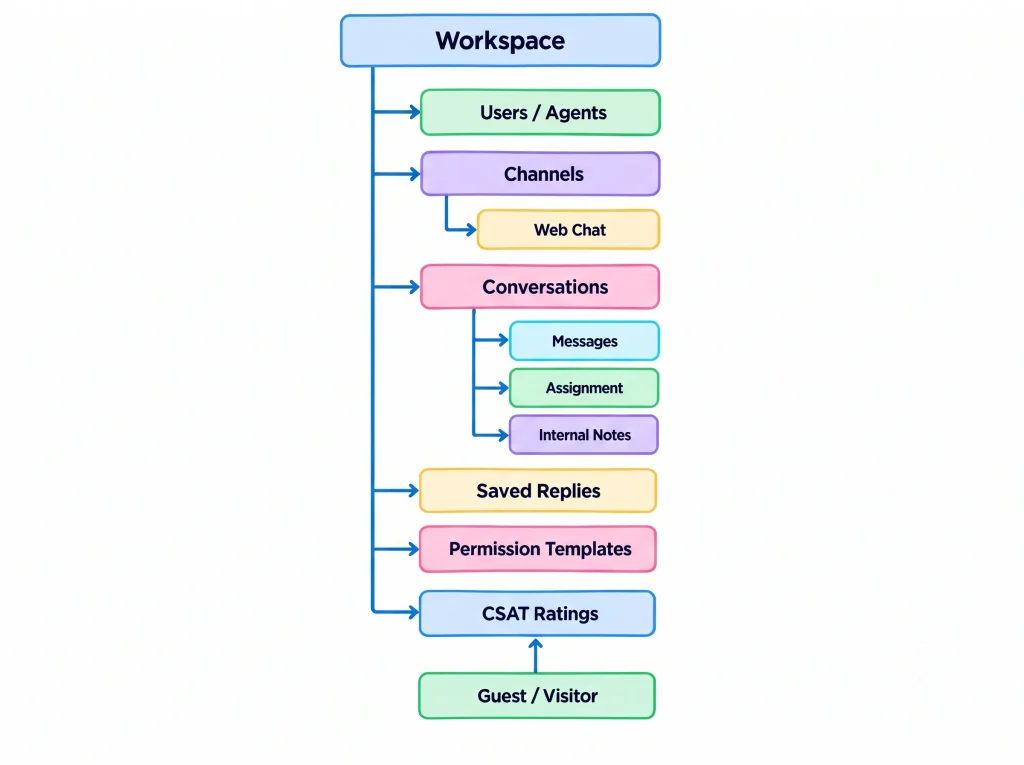
A typical interaction follows this model:
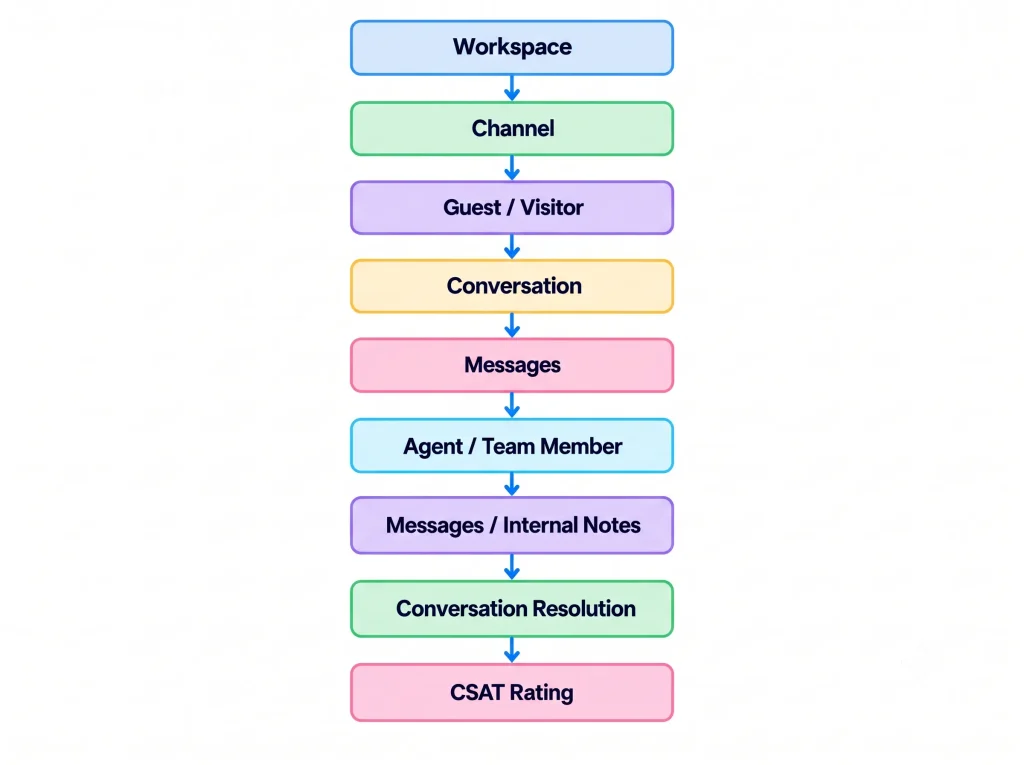
Understanding these relationships makes the later SDK, API, Real-Time, and Webhook documentation easier to follow.
Need Help?
Email: support@ysdesk.com
Documentation: https://docs.ysplugins.com/ys-desk