Standardized Error Envelope
REST API exceptions are returned using a consistent error structure.
{
“success”: false,
“statusCode”: 400,
“timestamp”: “2026-09-09T09:47:33.123Z”,
“path”: “/conversations/<CONVERSATION_ID>/messages”,
“message”: [
“Message cannot exceed 5000 characters”,
“Message content cannot be empty if no media is attached”
],
“error”: “Bad Request”
}
The message field can contain either a string or an array of validation messages.
HTTP Status Codes
| Status | Meaning |
| 200 OK | Successful retrieval, update, or synchronization |
| 201 Created | Successful resource creation |
| 204 No Content | Successful deletion or purge |
| 400 Bad Request | Invalid or incomplete request |
| 401 Unauthorized | Missing or invalid authentication |
| 403 Forbidden | Insufficient permission, role, or feature access |
| 404 Not Found | Requested resource does not exist |
| 429 Too Many Requests | Rate limit exceeded |
| 500 Internal Server Error | Unexpected server-side failure |
| 503 Service Unavailable | Health check indicates service dependency failure |
Rate Limits
YS Desk currently applies a global HTTP rate limit of:
100 requests per 60 seconds per client IP
Requests exceeding the configured threshold return:
429 Too Many Requests
The limit is enforced globally through the backend throttling layer.
Handling Rate-Limit Responses
Clients should treat 429 as a temporary throttling response and retry only after an appropriate delay.
Do not assume a custom Retry-After header unless it is explicitly exposed by the current implementation.
Error Processing
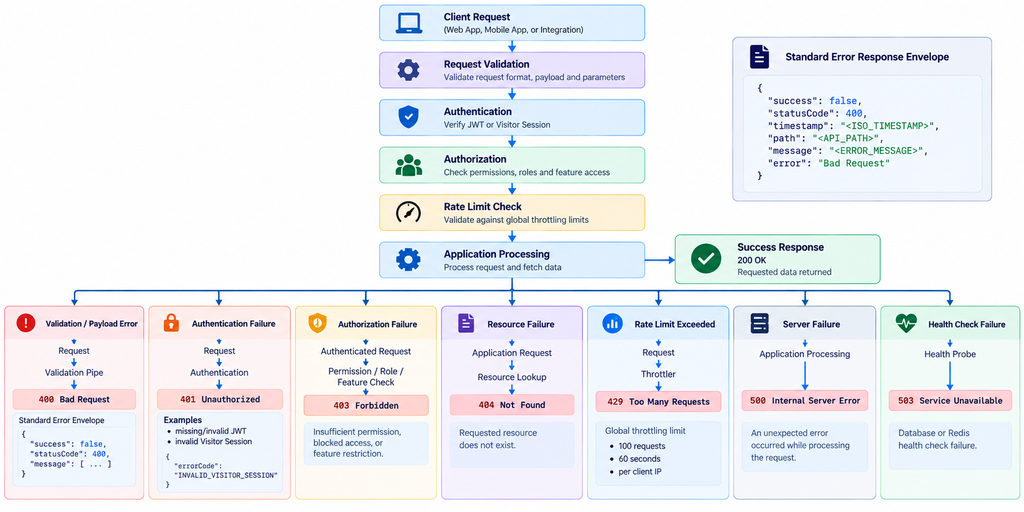
Figure REST-04 — Error processing pipeline illustrating validation failures, authorization rejections, and rate-limit responses.
Need Help?
Email: support@ysdesk.com
Documentation: https://docs.ysplugins.com/ys-desk