The Conversation composer lets Agents write formatted responses, insert emoji, reply to existing messages, and send messages directly from the Conversation.
Use the Composer
Open a Conversation and use the message composer at the bottom of the Conversation view.
The composer supports formatting controls including:
- Bold
- Italic
- Underline
- Bulleted lists
- Numbered lists
- Undo
- Redo
- Emoji
Draft Saving
Message drafts in the composer are automatically saved to local browser storage per Conversation. If you navigate away and return, your unsent text and formatting are restored.
Send a Message
Enter your message and press Enter to send it.
Use:
Enter → Send
Shift+Enter → New line
Message Length
Messages support a maximum length of 5,000 characters.
Keep long responses concise enough to remain within this limit.
Reply to a Message
Use Reply on an existing message to quote that message in your response.
The composer displays a reply banner containing the referenced message.
Use the X control on the banner to cancel the reply.
Message Delivery States
Messages can move through these client-visible delivery states:
PENDING
SENT
DELIVERED
SEEN
FAILED
A failed message provides a retry action when available.
For the underlying real-time message event contract, see:
[Real-Time → Events → Message Events]
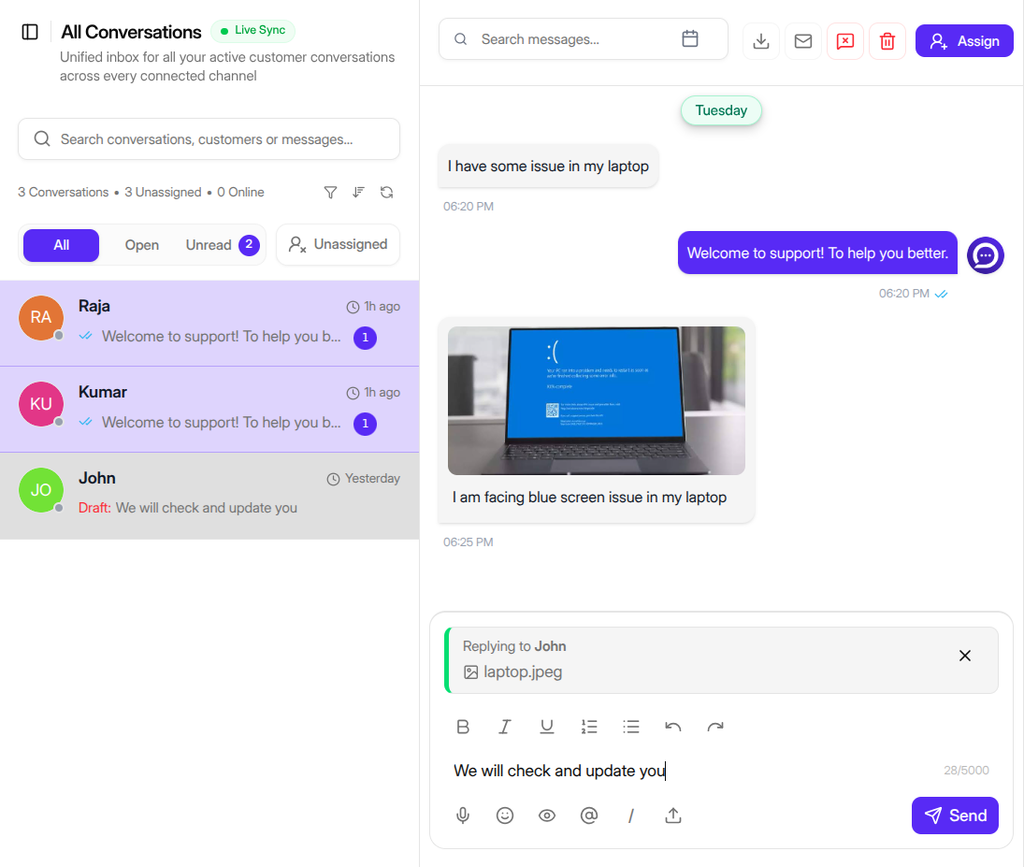
Figure G-07 Composer with formatting toolbar and message reply state
Need Help?
Email: support@ysdesk.com
Documentation: https://docs.ysplugins.com/ys-desk