Security settings help protect account access, Workspace membership, and session activity.
Account Login & Security
Navigate to:
Settings → Account → Login & Security
Review the available account-security controls from this page.
Multi-Factor Authentication
Where MFA is enabled for the account, an authenticator-based verification step is used during login.
Use the MFA controls provided by the security settings page to configure the account’s authentication requirements.
When Enforce MFA for all logins is enabled, a confirmation dialog begins a 10-second countdown before the current session is logged out so the authenticator setup can be completed on the next login.
Session Security
Account authentication and session management are handled through the configured Auth0 security flow. YS Desk does not currently expose a manual active-session management list in the application.
Treat authentication credentials as private information.
Team Activity Log
Workspace security activity can be reviewed from:
Settings → Workspace Settings → Team Activity Log
The activity view can contain security-related information such as:
- Login timestamps
- IP addresses
- User-agent information
- Security events
Because this information can contain sensitive operational data, use access controls and avoid reproducing real activity records in public documentation screenshots.
Safe Credential Handling
YS Desk uses different credential types for different purposes.
A Channel Token may be used as part of Web Chat installation and channel configuration.
Authentication tokens such as Auth0 access tokens and Visitor Session tokens must remain protected and should never be published in documentation or embedded as public credentials.
Never place real credentials in:
- code examples
- screenshots
- Git repositories
- support conversations
- public documentation
Use placeholders in documentation examples:
<CHANNEL_TOKEN>
<AUTH0_ACCESS_TOKEN>
<VISITOR_SESSION_TOKEN>
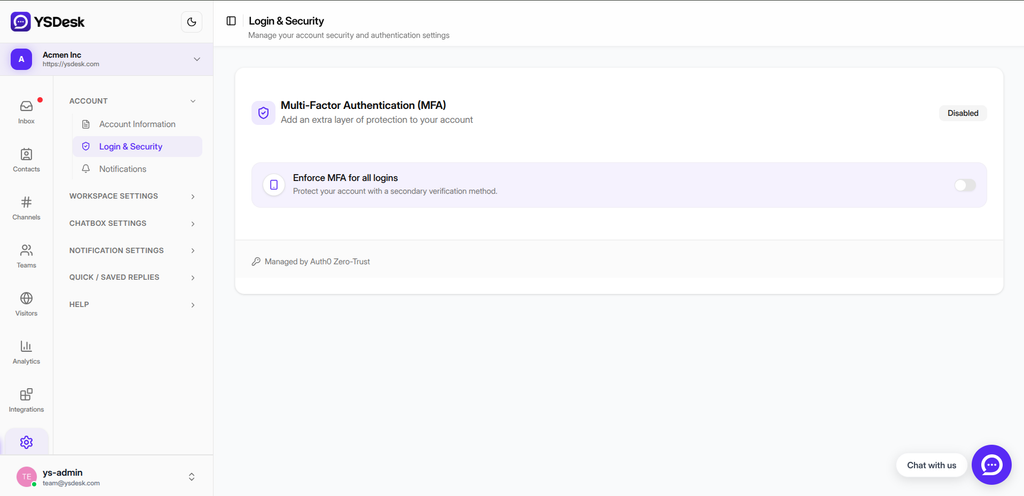
Figure G-21 Login & Security settings showing the available account-security controls.
Need Help?
Email: support@ysdesk.com
Documentation: https://docs.ysplugins.com/ys-desk