Workspace Management provides access to the Workspace’s identity, company profile, regional formatting, and high-impact administrative controls.
Workspace Information
Open:
Settings → Workspace Settings → Workspace Information
The Workspace information area includes identity and company information such as:
Identity
- Workspace Display Name
- Workspace Website Domain
- Support Email
Company Profile
- Industry
- Team Size
- Official Company Address
Regional Settings
Available regional formatting can include:
- Interface language
- Date format
- Time format
- Currency
Examples include:
DD/MM/YYYY
MM/DD/YYYY
12-hour
24-hour
USD
INR
EUR
GBP
Danger Zone
High-impact Workspace actions are grouped in the Danger Zone.
These can include:
Delete Workspace
Workspace deletion is a destructive operation.
The workflow requires explicit confirmation and may require entering the Workspace name before deletion can proceed.
Workspace deletion starts a 7-day recoverable pending-deletion period and requires typing the exact Workspace name to confirm the action.
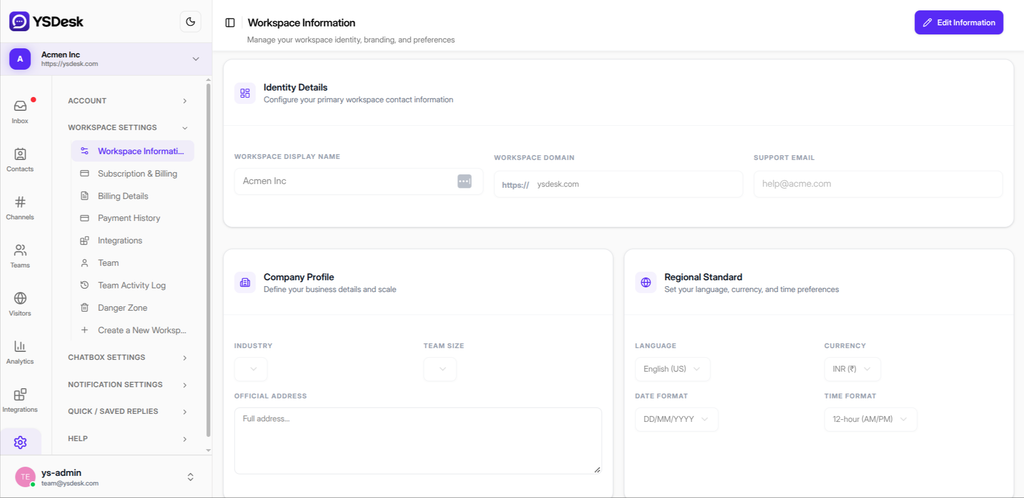
Figure G-19 Workspace Information page showing profile and regional settings.
Need Help?
Email: support@ysdesk.com
Documentation: https://docs.ysplugins.com/ys-desk