Billing lets Workspace owners manage plans, billing cycles, billing details, payments, and subscription cancellation.
Open Billing
Navigate to:
Settings → Workspace Settings → Subscription & Billing
The billing dashboard can show:
- Current Plan
- Billing cycle
- Renewal date
- Seat usage
- Conversation usage
- Plan comparison
Current Plans
The current plan configuration identified by the audit is:
| Eligible Free workspaces can activate a 14-day Starter or Growth trial from Billing without payment details. | ||||
| Plan | Monthly price | Annual price | Included seats | Conversation allowance |
| Free | $0/month | — | 1 | 100/month |
| Starter | $12/month | $9/month equivalent | 3 | 500/month |
| Growth | $39/month | $29/month equivalent | 10 | 2,000/month |
| Enterprise | Contact Sales | Custom | Custom | Custom |
Plan pricing and limits can change independently from documentation, so this table should be reviewed whenever the production billing configuration changes.
Upgrade a Plan
Select Upgrade on the appropriate plan card.
For supported upgrades, YS Desk takes you to the billing checkout flow.
Billing Details
Open:
Settings → Workspace Settings → Billing → Billing Details
Billing details can include:
- Billing name
- Tax ID / GSTIN
- Billing email
- Address
Payment History
Open the payment history area to review billing records such as:
- Invoice ID
- Date
- Amount
- Currency
- Status
The available payment states identified by the implementation include:
PAID
FAILED
REFUNDED
Cancel a Subscription
Select Cancel Subscription.
A confirmation dialog is displayed before cancellation is completed.
The cancellation workflow is designed to preserve the subscription through the applicable billing period before transitioning to the Free plan.
Access
Billing settings are restricted to the Workspace Owner.
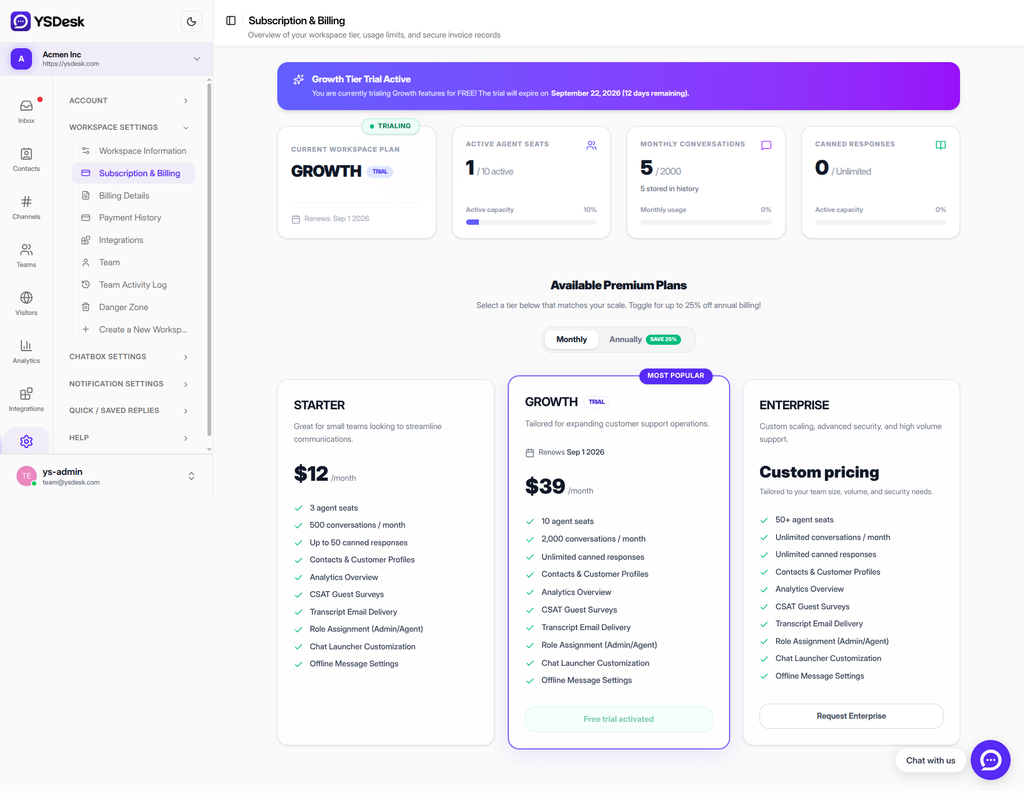
Figure G-18 Billing dashboard showing plan cards and usage
Need Help?
Email: support@ysdesk.com
Documentation: https://docs.ysplugins.com/ys-desk