Analytics provides Workspace-level visibility into Conversation performance, response times, Visitors, team performance, customer insights, and reports.
Open Analytics
Navigate to:
Analytics
The Analytics area provides the main overview and specialized reporting views.
Analytics Overview
The overview can present KPI cards such as:
- Total Conversations
- Active Conversations
- Resolved Conversations
- Average Response Time
- First Response Time
- Total Visitors
- Live Visitors
Use these metrics to understand current support activity and historical performance.
Analytics Retention
Workspaces on the Free plan retain historical analytics and CSAT data for 30 days.
Conversation Analytics
Conversation analytics provide visual trends such as:
- Conversation volume over time
- Channel distribution
- Peak support periods
Use date filters to compare different reporting periods.
Team Performance
Team Performance provides Agent-level metrics such as:
- Conversations handled
- Average response time
- Resolution rate
- Online time
Team Performance requires the Growth plan.
Customer Insights
Customer Insights provides analysis such as:
- Geographic distribution
- Device distribution
- Popular visitor pages
Customer Insights requires the Growth plan.
CSV Reports
Open:
Analytics → Reports & Export
Review the Last 7 Days report snapshot and select Download CSV Report to export the available report data.
CSV Report Export requires the Growth plan.
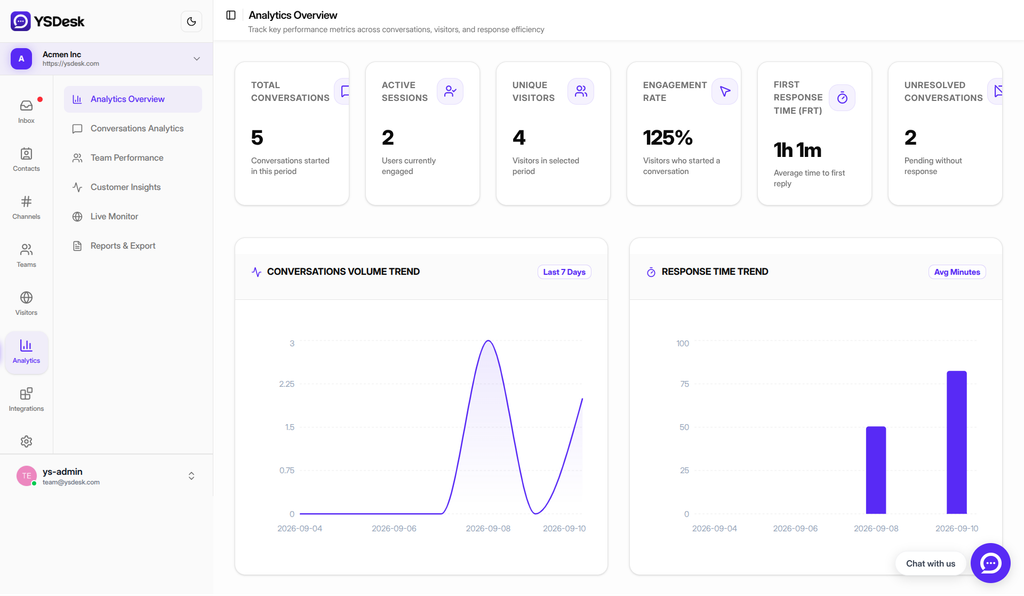
Figure G-17 Analytics Overview showing KPI cards and trend charts.
Need Help?
Email: support@ysdesk.com
Documentation: https://docs.ysplugins.com/ys-desk