Customer Satisfaction (CSAT) lets Visitors rate their support experience after a Conversation.
Enable CSAT
Open:
Settings → Chatbox Settings → Chat Settings
Enable the Satisfaction Surveys feature.
CSAT availability requires a supported paid plan. The current plan baseline identifies Starter and Growth as CSAT-enabled plans.
Trigger a Survey
CSAT can be presented automatically after Conversation resolution.
An Agent can also manually send the survey from a resolved Conversation using Send CSAT Survey when that action is available.
Survey Delivery Links
CSAT surveys are available through the public survey route:
/csat/:conversationId
Visitor Survey
The Visitor sees a five-star satisfaction scale:
1 2 3 4 5
The Visitor can provide an optional written comment.
The survey can be submitted or skipped according to the available controls.
View CSAT Results
After feedback is submitted, the Agent workspace can show the rating and customer feedback within the Conversation interface.
CSAT Workflow
Conversation resolved
↓
CSAT survey presented
↓
Visitor selects 1–5 stars
↓
Optional comment
↓
Submit feedback
↓
Rating available to Agent
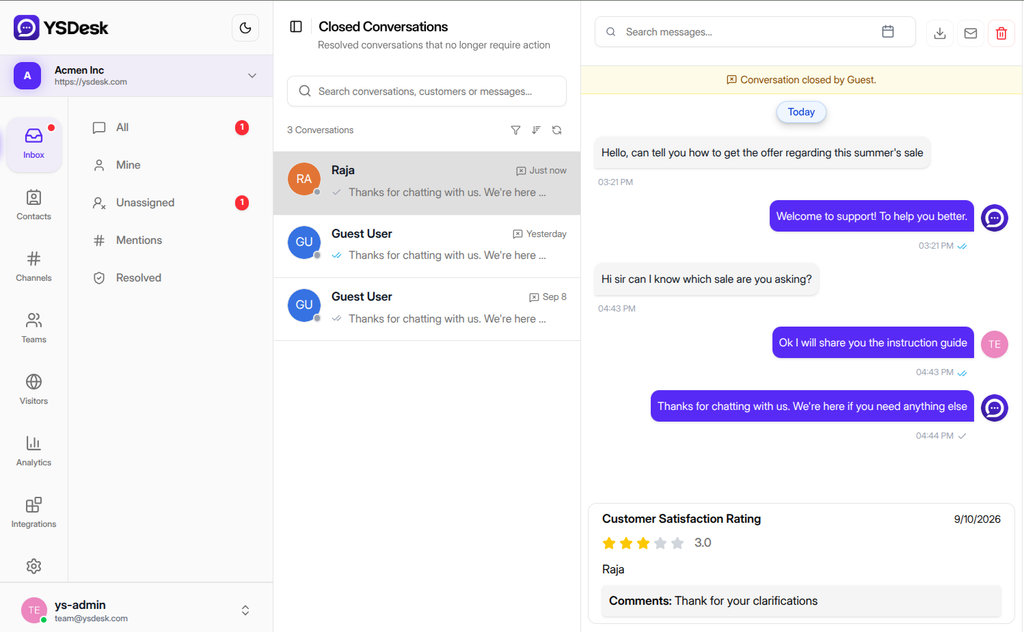
Figure G-16 CSAT survey and Agent-side rating display.
Need Help?
Email: support@ysdesk.com
Documentation: https://docs.ysplugins.com/ys-desk