YS Desk provides both a centralized Contacts directory and a live Visitor view for understanding customer context and active Web Chat activity.
Contacts Directory
Open:
Contacts → All Contacts
The Contacts directory provides:
- Name
- Phone
- Location
- First seen
- Last seen
- Conversation count
- CSAT Score
Use the directory to locate a customer profile and review their associated activity.
Customer Sub-Views
Under the Contacts navigation:
- All Contacts: Full directory of known Visitors.
- Active Customers: View Visitors currently active on the site.
- Customer Activity: View the activity history associated with Visitors.
Live Visitor Monitor
Open:
Analytics → Live Monitor
(or)
Visitors -> Live Visitors
You can also access visitor information from Visitors in the sidebar.
The Live Monitor requires the Growth plan.
The Live Monitor provides a real-time view of active Visitors.
The view includes an interactive world map and Visitor cards.
Depending on available Visitor information, cards can show:
- Device type
- Operating system
- Browser
- Current page
- Idle state
Visitor Context
Select a Visitor or Contact to inspect additional context and previous Conversation history.
Where available, technical telemetry can include location and connection-related information.
Use such information only when necessary for support and troubleshooting.
Privacy
Visitor IP addresses and other technical telemetry are sensitive information.
Do not reproduce real visitor IP addresses or personal data in public documentation screenshots.
Use sanitized demonstration data when capturing screenshots.
Plan Availability
The Contacts directory is controlled by the Workspace’s Contacts feature availability.
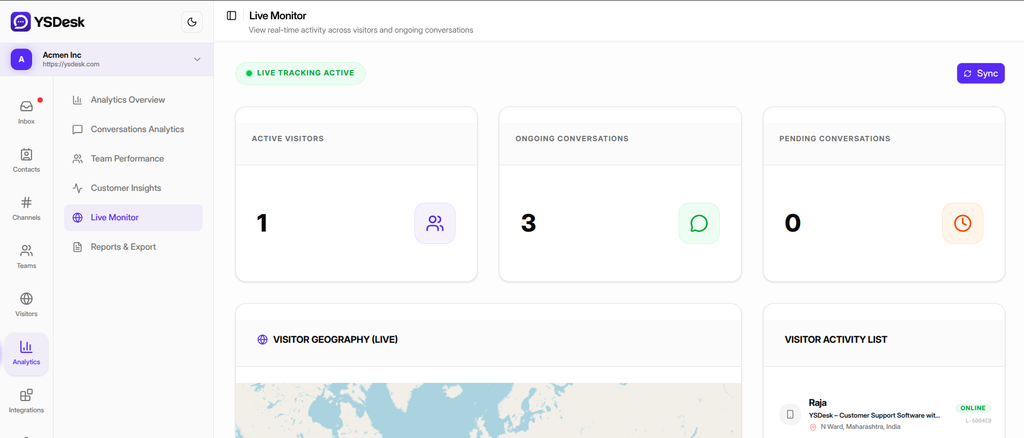
Figure G-13 Live Visitor Monitor showing the map and Visitor list
Need Help?
Email: support@ysdesk.com
Documentation: https://docs.ysplugins.com/ys-desk