Internal Notes let Team Members record private information about a Conversation without sending that information to the Visitor.
Switch to Internal Note Mode
Use the eye control in the composer toolbar to switch between normal public replies and Internal Note mode.
The interface visually changes to indicate that the composer is private.
Identify an Internal Note
Internal Notes use a distinct visual treatment, including a gold/yellow composer background and an Internal Note indicator.
This visual distinction helps prevent accidentally sending private notes as public messages.
Internal Notes also support @ mentions of Team Members.
Privacy Boundary
Internal Notes are visible to authorized Workspace Team Members.
They are not delivered to the Web Chat Visitor.
They should therefore be used for internal coordination, troubleshooting notes, handoffs, and other information that should remain within the Workspace.
Permission Requirement
Internal Notes require the appropriate internal-note permission:
Permission Requirement
Internal Notes require the Message Internal Note (`message-internal-note`) permission in the Messages permission group. When this permission is disabled, the Internal Note toggle is hidden from the message composer.
Assignment Behavior
Sending an Internal Note in an unassigned Conversation does not trigger the normal automatic assignment that occurs from a public Agent reply.
Internal Notes Diagram
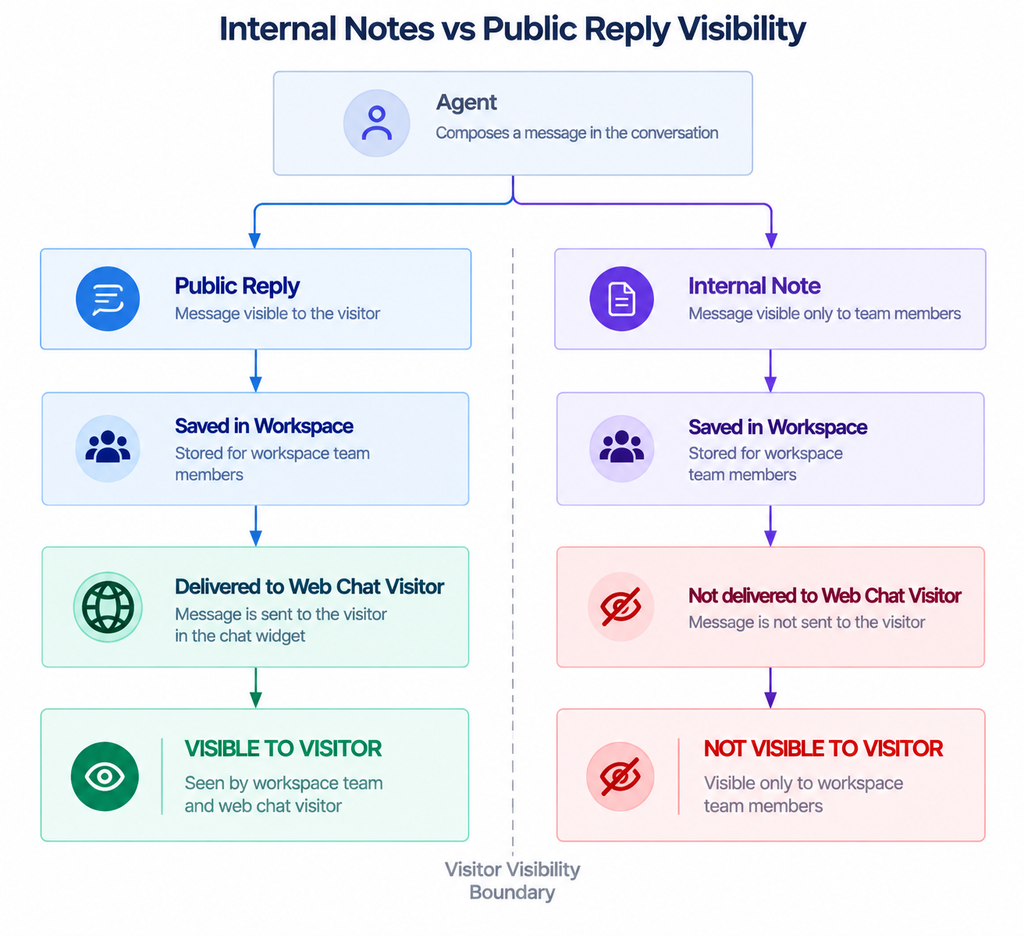
Figure G-09 Internal Notes vs Public Reply Visibility.
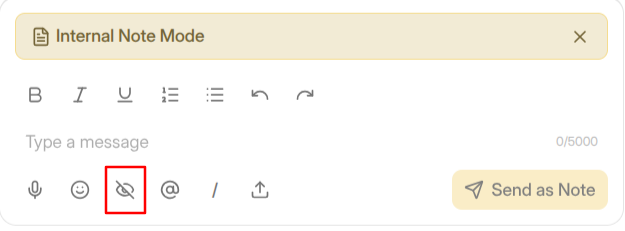
Figure G-10 Internal Note composer with the private visual treatment
Need Help?
Email: support@ysdesk.com
Documentation: https://docs.ysplugins.com/ys-desk