Webhook Security & Signature Verification
Webhook endpoints are protected through provider-specific cryptographic verification.
YS Desk uses two different verification models:
Razorpay
Local HMAC-SHA256 verification
PayPal
PayPal webhook-signature verification API
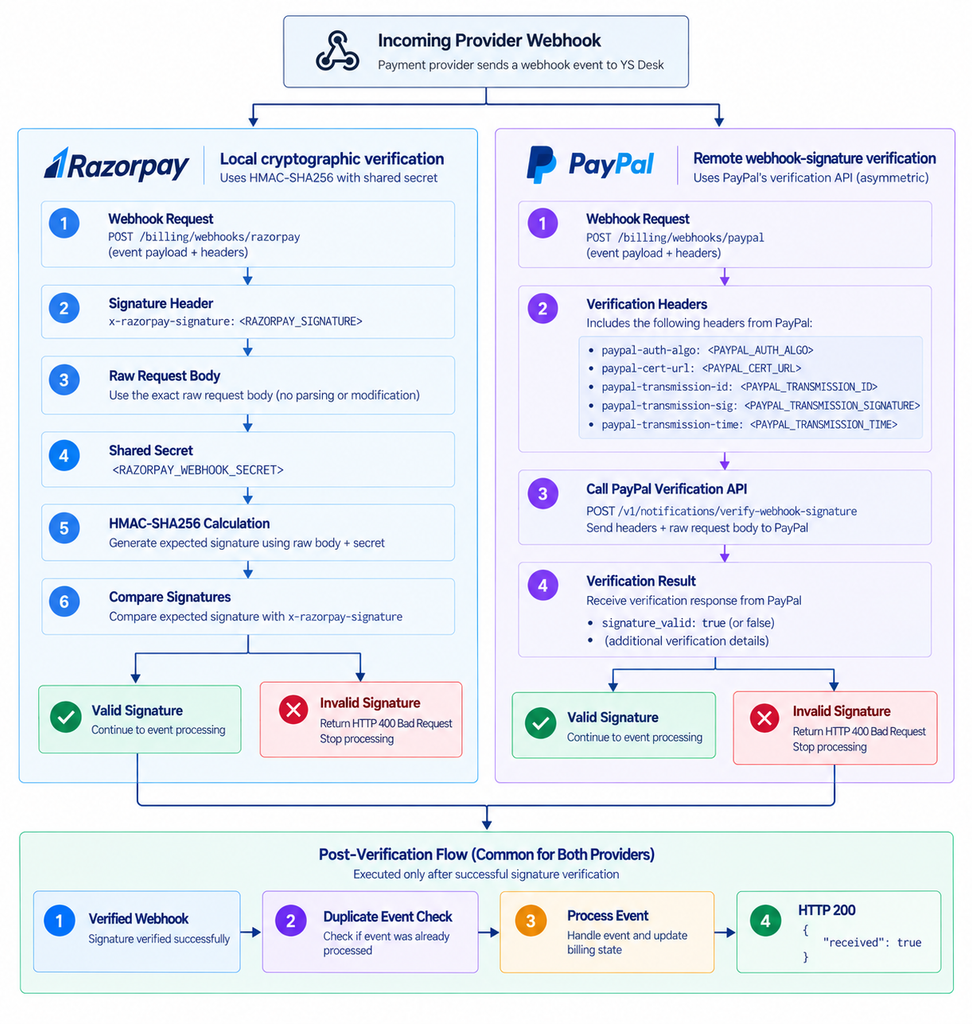
Figure WH-04 — Cryptographic verification comparison: symmetric HMAC versus remote asymmetric validation.
Razorpay Verification
Razorpay uses a shared webhook secret and an HMAC-SHA256 signature.
The provider sends:
x-razorpay-signature: <RAZORPAY_SIGNATURE>
YS Desk calculates the expected digest from:
Raw Request Body
+
<RAZORPAY_WEBHOOK_SECRET>
The calculated HMAC-SHA256 digest is compared with the provider-supplied signature.
Conceptual implementation:
const expectedSignature = createHmac(
“sha256”,
“<RAZORPAY_WEBHOOK_SECRET>”
)
.update(rawBody)
.digest(“hex”);
The request is accepted only when the calculated signature matches the supplied signature.
PayPal Verification
PayPal uses an asymmetric verification model.
The webhook request supplies the verification metadata through:
paypal-auth-algo
paypal-cert-url
paypal-transmission-id
paypal-transmission-sig
paypal-transmission-time
YS Desk passes the required verification information to PayPal’s webhook verification service:
/v1/notifications/verify-webhook-signature
The verification result determines whether the webhook may continue to event processing.
Verification Failure
A webhook that fails provider verification must not continue into billing processing.
Examples include:
- invalid Razorpay signature
- missing Razorpay webhook configuration
- invalid PayPal signature
- missing PayPal verification headers
These requests receive an HTTP 400 Bad Request.
Example:
{
“statusCode”: 400,
“message”: “Invalid Razorpay webhook signature”,
“error”: “Bad Request”
}
or:
{
“statusCode”: 400,
“message”: “Invalid PayPal webhook signature”,
“error”: “Bad Request”
}
Secret Management
Webhook secrets are server-side configuration values.
For public documentation, use:
<RAZORPAY_WEBHOOK_SECRET>
<PAYPAL_WEBHOOK_ID>
Never publish:
RAZORPAY_WEBHOOK_SECRET=<real-value>
PAYPAL_CLIENT_SECRET=<real-value>
Never place real credentials in:
- code examples
- screenshots
- Git repositories
- support tickets
- public documentation
- logs
- sample environment files distributed to developers
Raw Body Protection
Razorpay signature verification depends on the exact raw request body.
The YS Desk backend preserves the raw request body so that the cryptographic digest is calculated against the exact provider payload.
This requirement is specific to the Razorpay verification process.
Replay Protection and Duplicate Delivery
YS Desk does not use a separate Razorpay transmission-timestamp security window.
Instead, duplicate webhook protection is based on the provider event identifier and persisted webhook processing state.
This means the same provider event can be safely received again without causing the associated billing mutation to execute a second time.
What Is Not Publicly Documented
The following implementation details are intentionally excluded from the public Webhooks contract:
- actual webhook secrets
- sandbox bypass headers
- private database collection details
- internal database model names
- internal queue implementation
- private service URLs
- internal environment values
- payment-provider credentials
- private key material
The public documentation describes the security behavior without exposing internal infrastructure or credentials.
Need Help?
Email: support@ysdesk.com
Documentation: https://docs.ysplugins.com/ys-desk