PayPal Webhooks
YS Desk receives PayPal billing events through:
POST /billing/webhooks/paypal
PayPal webhook requests use asymmetric signature verification through PayPal’s webhook verification service.
Unlike Razorpay, YS Desk does not calculate the PayPal signature locally with a shared HMAC secret.
[Webhooks → Security & Signatures]
[Webhooks → Delivery & Idempotency]
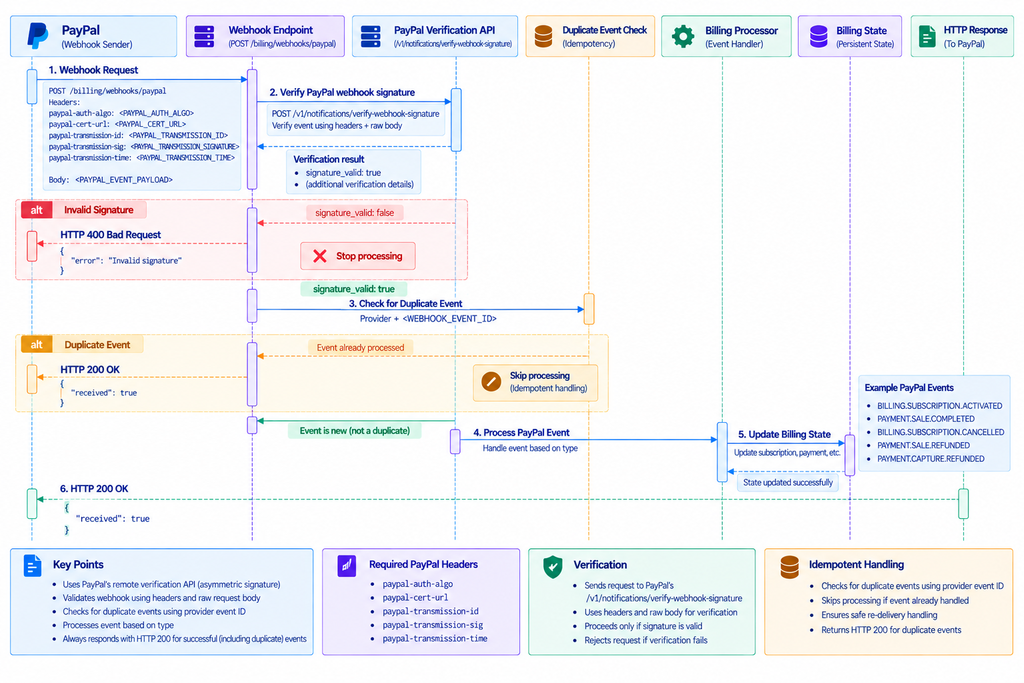
Figure WH-03 — PayPal asymmetric signature verification and event processing.
PayPal Verification Headers
PayPal webhook verification requires these headers:
paypal-auth-algo: <PAYPAL_AUTH_ALGO>
paypal-cert-url: <PAYPAL_CERT_URL>
paypal-transmission-id: <PAYPAL_TRANSMISSION_ID>
paypal-transmission-sig: <PAYPAL_TRANSMISSION_SIGNATURE>
paypal-transmission-time: <PAYPAL_TRANSMISSION_TIME>
The values are supplied by PayPal with the webhook request.
Use placeholders in examples rather than actual provider values.
PayPal Signature Verification
YS Desk validates the webhook through PayPal’s webhook-signature verification API.
The verification process uses the provider-supplied transmission information together with the webhook payload.
The relevant PayPal verification operation is:
/v1/notifications/verify-webhook-signature
This verification step allows YS Desk to confirm that the webhook originated from PayPal and that the signed transmission information is valid.
PayPal Webhook Response
A successfully accepted webhook returns:
HTTP/1.1 200 OK
{
“received”: true
}
Missing verification headers or an invalid signature result in:
400 Bad Request
Example:
{
“statusCode”: 400,
“message”: “Invalid PayPal webhook signature”,
“error”: “Bad Request”
}
When required verification headers are absent, YS Desk rejects the request before normal event processing.
Supported PayPal Events
YS Desk handles the following PayPal events:
| Event | Purpose | YS Desk processing |
| BILLING.SUBSCRIPTION.ACTIVATED | Subscription becomes active | Activates the Workspace subscription and synchronizes the billing period |
| BILLING.SUBSCRIPTION.UPDATED | Subscription details change | Re-evaluates the applicable subscription state |
| PAYMENT.SALE.COMPLETED | Recurring payment completes | Records the payment and synchronizes subscription state |
| BILLING.SUBSCRIPTION.CANCELLED | Subscription is cancelled | Schedules the corresponding subscription cancellation |
| BILLING.SUBSCRIPTION.EXPIRED | Subscription expires | Processes the applicable subscription end state |
| BILLING.SUBSCRIPTION.SUSPENDED | Subscription is suspended | Updates the subscription into the applicable past-due state |
| PAYMENT.SALE.DENIED | Payment is denied | Records the failed payment and updates subscription billing state |
| PAYMENT.SALE.REFUNDED | Sale is refunded | Records the refund and applies the applicable refund-related subscription transition |
| PAYMENT.CAPTURE.REFUNDED | Capture is refunded | Records the refund and applies the applicable refund-related subscription transition |
| PAYMENT.REFUND.COMPLETED | Refund completes | Records the completed refund and applies the applicable refund-related subscription transition |
Only the events listed above are part of the YS Desk PayPal webhook contract.
PayPal Subscription Events
BILLING.SUBSCRIPTION.ACTIVATED
When a PayPal subscription becomes active, YS Desk activates the associated Workspace subscription and synchronizes the applicable billing period.
BILLING.SUBSCRIPTION.UPDATED
YS Desk evaluates updates to the PayPal subscription and applies the resulting state when the event indicates an active subscription.
BILLING.SUBSCRIPTION.CANCELLED
YS Desk processes subscription cancellation and schedules the corresponding end-of-period transition where applicable.
BILLING.SUBSCRIPTION.EXPIRED
An expired PayPal subscription is processed as a subscription lifecycle termination.
BILLING.SUBSCRIPTION.SUSPENDED
A suspended subscription is treated as a billing issue and moves to the applicable past-due state.
PayPal Payment and Refund Events
PAYMENT.SALE.COMPLETED
YS Desk records the successful payment and synchronizes the related subscription state.
PAYMENT.SALE.DENIED
YS Desk records the failed payment and updates the applicable subscription billing state.
PAYMENT.SALE.REFUNDED
The completed refund is recorded and the associated subscription transition is applied.
PAYMENT.CAPTURE.REFUNDED
YS Desk handles a refunded capture as a refund transaction and applies the associated subscription transition.
PAYMENT.REFUND.COMPLETED
YS Desk records the completed refund and applies the applicable refund-related subscription transition.
PayPal Event Identifiers
PayPal event identifiers are used for duplicate detection.
The primary identifier is:
When unavailable, the implementation uses a provider-specific fallback based on the event type and creation timestamp.
This prevents repeated provider deliveries from applying the same billing mutation multiple times.
Need Help?
Email: support@ysdesk.com
Documentation: https://docs.ysplugins.com/ys-desk