Razorpay Webhooks
YS Desk receives Razorpay billing and subscription events through:
POST /billing/webhooks/razorpay
The endpoint is designed for server-to-server delivery from Razorpay.
Razorpay webhook requests are authenticated using an HMAC-SHA256 signature calculated from the raw request body and the configured webhook secret.
[Webhooks → Security & Signatures]
[Webhooks → Delivery & Idempotency]
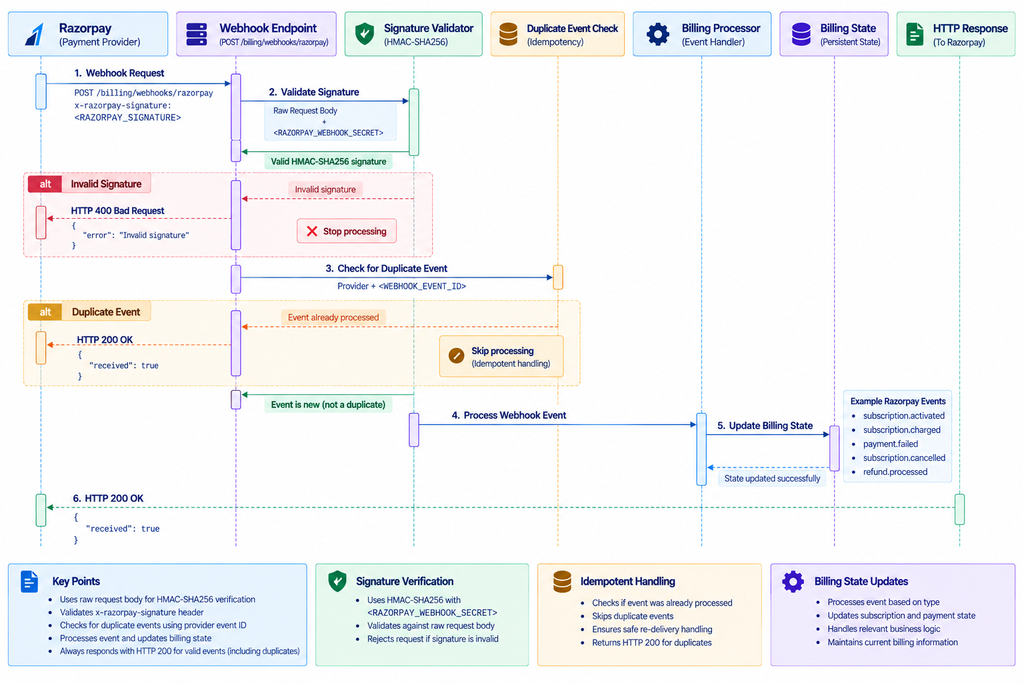
Figure WH-02 — Razorpay webhook signature verification and subscription lifecycle.
Razorpay Signature Verification
The provider sends the webhook signature in:
x-razorpay-signature: <RAZORPAY_SIGNATURE>
YS Desk computes an HMAC-SHA256 digest using:
<RAZORPAY_WEBHOOK_SECRET>
and the unmodified raw request body.
Conceptually:
const expectedSignature = createHmac(
“sha256”,
“<RAZORPAY_WEBHOOK_SECRET>”
)
.update(rawBody)
.digest(“hex”);
The resulting digest is compared with the x-razorpay-signature header.
The webhook is rejected when the signature does not match.
Raw Request Body
The original request body is required because the signature is calculated against the raw bytes received from Razorpay.
The verification process must therefore occur before the request body is transformed in a way that changes the signed representation.
Razorpay Webhook Response
Successful processing returns:
HTTP/1.1 200 OK
{
“received”: true
}
Invalid signature requests return:
400 Bad Request
Example:
{
“statusCode”: 400,
“message”: “Invalid Razorpay webhook signature”,
“error”: “Bad Request”
}
A missing webhook secret is also rejected rather than allowing the request to bypass verification.
Supported Razorpay Events
YS Desk handles the following Razorpay events.
| Event | Purpose | YS Desk processing |
| subscription.authenticated | Subscription authorization completed | Logged for subscription lifecycle tracking |
| subscription.activated | Subscription becomes active | Activates the Workspace subscription and synchronizes the billing period |
| subscription.charged | Recurring subscription payment captured | Records the payment and synchronizes the active subscription period |
| subscription.pending | Payment is pending | Updates the subscription into the applicable past-due state |
| subscription.halted | Subscription recurring attempts have been halted | Updates the subscription into the applicable past-due state |
| subscription.cancelled | Subscription is cancelled | Schedules cancellation according to the current subscription period |
| subscription.completed | Subscription reaches the end of its billing cycle | Finalizes the applicable subscription transition |
| payment.failed | Payment attempt failed | Records the failed payment and updates subscription billing state |
| refund.created | Refund has been created | Marks refund processing as in progress |
| refund.processed | Refund has completed | Records the refund and applies the applicable refund-related subscription transition |
The provider event name should always be treated as case-sensitive.
Razorpay Subscription Events
subscription.authenticated
This event indicates that the subscription authorization step has completed.
YS Desk records the event as part of the subscription lifecycle. Activation is handled by the subsequent subscription lifecycle events.
subscription.activated
When the subscription becomes active, YS Desk updates the Workspace subscription state and synchronizes the provider billing period.
Relevant provider information includes the subscription plan and billing-period values.
subscription.charged
This event represents a successful recurring subscription payment.
YS Desk records the payment and synchronizes the subscription’s active billing period.
subscription.pending
A pending subscription payment moves the applicable subscription state toward a past-due condition until the billing state is resolved.
subscription.halted
A halted subscription indicates that recurring payment attempts have reached the provider’s configured retry limit.
YS Desk handles this as a billing problem and updates the subscription state accordingly.
subscription.cancelled
When Razorpay reports cancellation, YS Desk schedules the corresponding subscription cancellation according to the active billing period.
subscription.completed
This event indicates that the subscription has completed its configured lifecycle.
YS Desk finalizes the corresponding subscription transition.
Razorpay Payment and Refund Events
payment.failed
YS Desk records the failed payment and updates the applicable subscription billing state.
refund.created
YS Desk marks the refund as being processed.
refund.processed
After the refund is processed successfully, YS Desk records the refunded payment and applies the corresponding refund-related subscription transition.
Razorpay Event Identifiers
YS Desk uses the provider event identifier for duplicate detection.
The normal identifier is:
When an event identifier is unavailable, the implementation uses a provider-specific fallback derived from the event name and creation timestamp.
This protects billing state from duplicate processing when a provider retries an already delivered event.
Razorpay Development and Production Boundary
YS Desk contains an internal sandbox billing webhook endpoint for development and testing.
That internal route is:
/billing/webhook
It is not a public provider webhook endpoint and should not be used as the production Razorpay integration URL.
The production integration endpoint is:
POST /billing/webhooks/razorpay
The internal sandbox bypass mechanism is intentionally excluded from public developer documentation.
Need Help?
Email: support@ysdesk.com
Documentation: https://docs.ysplugins.com/ys-desk