Presence & Visitor Events
Presence events synchronize Agent availability and live Visitor activity. Visitor events can communicate navigation, idle state, widget visibility, device information, and live location metadata to the Agent dashboard.
Event Matrix
| Event | Direction | Client | Purpose |
| user:presence | Server → Client | Agent, Visitor | Agent online/offline state |
| status:update | Server → Client | Agent | Agent status update |
| user:activity | Client → Server | Agent | Active interaction signal |
| heartbeat | Client → Server | Agent | Keepalive and idle tracking |
| visitor:navigation | Client → Server | Visitor | Reports current host page |
| visitor:heartbeat | Client → Server | Visitor | Visitor keepalive |
| guest:status:update | Client → Server | Visitor | Updates visitor presence and telemetry |
| guest:status:broadcast | Server → Client | Agent | Broadcasts live Visitor state |
| guest:statuses:request | Client → Server | Agent | Requests Visitor status snapshot |
| guest:statuses:all | Server → Client | Agent, Visitor | Returns active status snapshot |
| Core Concepts | Client → Server | Visitor | Reports widget visibility |
| widget:visibility:changed | Server → Client | Agent | Announces widget visibility changes |
| agent:initiate:chat | Bidirectional | Agent → Visitor | Starts proactive chat |
Agent Presence
user:presence communicates Agent online/offline changes.
{
“userId”: “<USER_ID>”,
“isOnline”: true,
“timestamp”: “2026-09-10T10:15:00.000Z”
}
statusUpdate provides the Agent’s current status representation and last-seen information.
{
“userId”: “<USER_ID>”,
“isOnline”: true,
“lastSeen”: “2026-09-10T10:15:00.000Z”,
“user”: {
“id”: “<USER_ID>”,
“name”: “Sarah Connor”,
“email”: “sarah.connor@example.com”
}
}
Visitor Navigation
Visitors can report the current host page:
{
“url”: “https://example.com/pricing”,
“title”: “Enterprise Pricing Plans”
}
The information supports live visitor context in the Agent dashboard.
Visitor Heartbeats
Visitor clients can send:
{
“isIdle”: false
}
using visitor:heartbeat to maintain active visitor state.
Visitor Status
updateGuestStatus communicates the Visitor’s current state and available telemetry.
{
“isOnline”: true,
“trackingData”: {},
“onlineDuration”: 120
}
guest:status:broadcast
Agents receive live Visitor state through guest:status:broadcast.
{
“guestId”: “<GUEST_ID>”,
“name”: “Alex Mercer”,
“email”: “alex.mercer@example.com”,
“isOnline”: true,
“isAnonymous”: false,
“isIdle”: false,
“workspaceId”: “<WORKSPACE_ID>”,
“currentUrl”: “https://example.com/pricing”,
“pageTitle”: “Enterprise Pricing Plans”,
“websiteDomain”: “example.com”,
“connectedAt”: “2026-09-10T10:00:00.000Z”,
“updatedAt”: “2026-09-10T10:15:00.000Z”
}
Location and device information may also be included when available.
{
“location”: {
“city”: “Austin”,
“region”: “Texas”,
“country”: “United States”,
“timezone”: “America/Chicago”,
“source”: “gps”,
“confidence”: “high”
},
“device”: {
“browser”: “Chrome 128.0”,
“os”: “macOS 15.0”,
“deviceType”: “desktop”
}
}
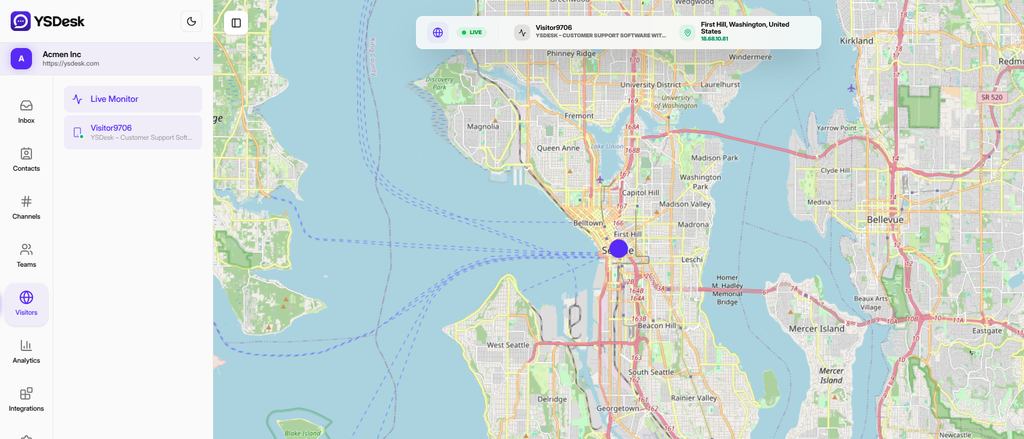
Figure RT-05 — Visitor telemetry and live presence lifecycle.
Visitor Status Snapshot
Agents can request currently active visitor statuses through:
guest:statuses:request
The corresponding response is delivered through guest:statuses:all and contains a Visitor status snapshot.
Widget Visibility
Visitors can report whether the Web Chat interface is visible:
{
“isVisible”: true
}
Agents receive corresponding updateWidgetVisibility updates.
Proactive Chat
An Agent can initiate a conversation with a Visitor through agent:initiate:chat.
{
“agentId”: “<AGENT_ID>”,
“agentName”: “Sarah Connor”,
“message”: “How can we help you?”,
“workspaceId”: “<WORKSPACE_ID>”
}
The event targets the Visitor scope associated with the identified guest.
Need Help?
Email: support@ysdesk.com
Documentation: https://docs.ysplugins.com/ys-desk