Conversation & Assignment Events
Conversation events synchronize workspace inbox state, conversation lifecycle, assignment, priority, subscriptions, and unread counts.
Event Matrix
| Event | Direction | Client | Purpose |
| conversation:join | Client → Server | Agent, Visitor | Subscribe to a conversation |
| conversation:joined | Server → Client | Agent, Visitor | Confirm subscription |
| conversation:opened | Client → Server | Agent, Visitor | Indicate active conversation view |
| conversation:leave | Client → Server | Agent, Visitor | Leave conversation view |
| conversation:new | Server → Client | Agent, Visitor | Announce a new conversation |
| conversation:updated | Server → Client | Agent, Visitor | Synchronize conversation changes |
| conversation:deleted | Server → Client | Agent, Visitor | Announce conversation deletion |
| workspace:join | Client → Server | Agent | Join Workspace broadcast scope |
| workspace:joined | Server → Client | Agent | Confirm Workspace subscription |
| unread_count:update | Server → Client | Agent | Synchronize unread badges and counters |
Conversation Room Lifecycle
A client can subscribe to a conversation with:
{
“conversationId”: “<CONVERSATION_ID>”
}
using conversation:join.
The server confirms the subscription through:
{
“conversationId”: “<CONVERSATION_ID>”
}
on conversation:joined.
When the user opens the conversation view, the client may emit conversation:opened. When leaving the view, it emits conversation:leave.
conversation:new
Emitted when a new conversation is created.
{
“conversation”: {
“id”: “<CONVERSATION_ID>”,
“currentStatus”: “OPEN”
}
}
The complete conversation object may contain additional conversation properties appropriate to the client.
conversation:updated
conversation:updated synchronizes changes such as assignment, status, priority, pinned state, and the latest message.
{
“conversationId”: “<CONVERSATION_ID>”,
“id”: “<CONVERSATION_ID>”,
“currentStatus”: “OPEN”,
“status”: “OPEN”,
“priority”: “HIGH”,
“isPinned”: true,
“agentId”: “<AGENT_ID>”,
“agent”: {
“id”: “<AGENT_ID>”,
“name”: “Sarah Connor”,
“email”: “sarah.connor@example.com”,
“role”: “AGENT”,
“isOnline”: true
},
“updatedAt”: “2026-09-10T10:15:30.000Z”
}
The server coalesces bursts of conversation updates within a 200 ms window to reduce excessive update propagation.
Conversation Status
Current operational conversation statuses are:
OPEN
RESOLVED
The real-time event contract exposes the conversation status as part of conversation:updated.
conversation:deleted
{
“conversationId”: “<CONVERSATION_ID>”
}
This indicates that the conversation has been soft-deleted.
Unread Count Synchronization
unread_count:update keeps Agent-side badges synchronized.
Example:
{
“conversationId”: “<CONVERSATION_ID>”,
“unreadCount”: 2,
“userId”: “<USER_ID>”,
“workspaceId”: “<WORKSPACE_ID>”,
“globalCounts”: {
“total”: 5,
“inbox”: 5,
“myInbox”: 2,
“unassigned”: 3,
“mentions”: 1
}
}
Personal unread information may be emitted to the user’s room, while Workspace-wide badge information is synchronized at Workspace scope.
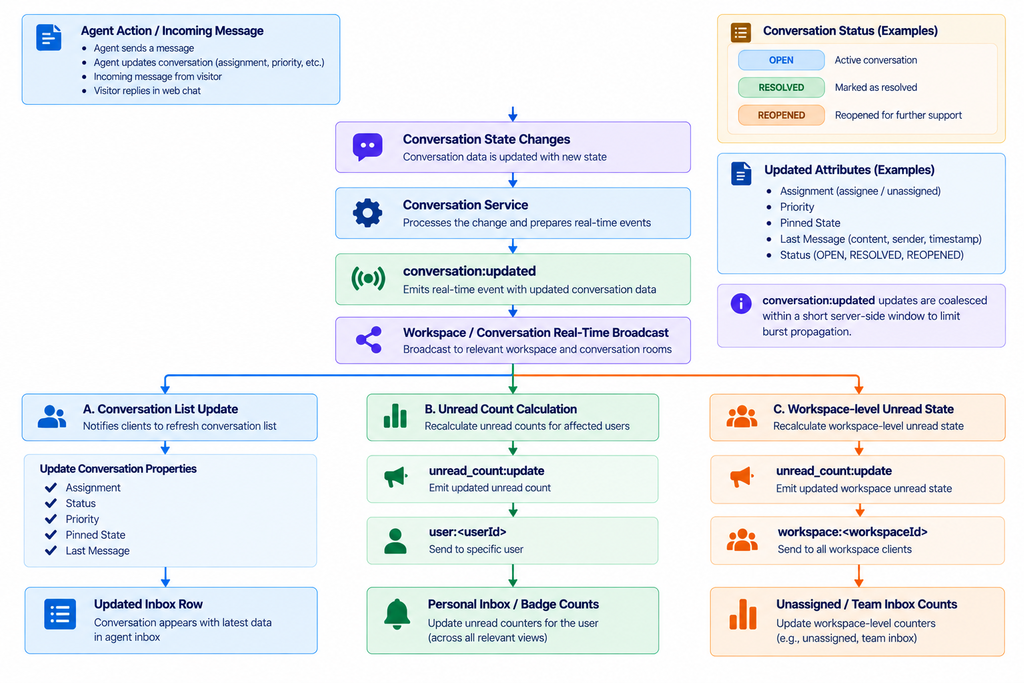
Figure RT-04 — Conversation state and unread count fan-out.
Workspace Subscription
Agents can join a Workspace broadcast scope through workspace:join. The server confirms this through workspace:joined.
{
“workspaceId”: “<WORKSPACE_ID>”
}
Need Help?
Email: support@ysdesk.com
Documentation: https://docs.ysplugins.com/ys-desk