Message Events
Message Events
Message events provide real-time synchronization for message creation, edits, deletion, delivery, seen state, and typing activity.
Event Matrix
| Event | Direction | Client | Purpose |
| message:send | Client → Server | Agent, Visitor | Sends a text or media message |
| message:new | Server → Client | Agent, Visitor | Announces a newly stored message |
| message:updated | Server → Client | Agent, Visitor | Announces an edited message |
| message:deleted | Server → Client | Agent, Visitor | Announces a deleted message |
| message:delivered | Bidirectional | Agent, Visitor | Confirms message delivery |
| message:seen | Bidirectional | Agent, Visitor | Confirms message visibility |
| typing | Bidirectional | Agent, Visitor | Publishes temporary typing state |
These event names use the standardized <domain>:<action> convention.
message:send
Use message:send when a client submits a new text or media message.
{
“conversationId”: “<CONVERSATION_ID>”,
“senderId”: “<USER_ID>”,
“content”: “Hello”,
“mediaUrl”: “<MEDIA_URL>”,
“mediaType”: “<MEDIA_TYPE>”,
“fileName”: “<FILE_NAME>”,
“parentId”: “<PARENT_MESSAGE_ID>”,
“isInternalNote”: false,
“mentionedUserIds”: [],
“clientMsgId”: “<CLIENT_MESSAGE_UUID>”
}
The applicable fields depend on whether the message contains text, media, a parent message, or an internal note.
message:new
The server emits message:new after the message has been stored.
Example payload:
{
“id”: “<MESSAGE_ID>”,
“conversationId”: “<CONVERSATION_ID>”,
“workspaceId”: “<WORKSPACE_ID>”,
“senderId”: “<USER_ID>”,
“sender”: {
“id”: “<USER_ID>”,
“name”: “Sarah Connor”,
“email”: “sarah.connor@example.com”,
“role”: “AGENT”
},
“content”: “Hello! How can I help you today?”,
“createdAt”: “2026-09-10T10:15:30.000Z”,
“parentId”: null,
“parentMessage”: null,
“isInternalNote”: false,
“mediaUrl”: null,
“mediaType”: null,
“fileName”: null,
“status”: “SENT”
}
Internal notes use the same message event with:
{
“isInternalNote”: true
}
and are isolated through the internal conversation room so Web Chat Visitors do not receive them.
message:updated
Sent when message content or associated metadata is edited.
{
“id”: “<MESSAGE_ID>”,
“conversationId”: “<CONVERSATION_ID>”,
“content”: “Updated message content”,
“updatedAt”: “2026-09-10T10:20:00.000Z”
}
message:deleted
Sent when a message is soft-deleted.
{
“messageId”: “<MESSAGE_ID>”,
“conversationId”: “<CONVERSATION_ID>”,
“deletedBy”: “<USER_ID>”,
“timestamp”: “2026-09-10T10:15:30.000Z”
}
Delivery and Seen Receipts
YS Desk separates delivery from visual read state.
message:delivered indicates that the receiving client has acknowledged delivery.
{
“messageId”: “<MESSAGE_ID>”,
“conversationId”: “<CONVERSATION_ID>”,
“status”: “DELIVERED”,
“deliveredAt”: “2026-09-10T10:15:35.000Z”,
}
message:seen indicates that the message became visible in the recipient’s viewport.
{
“messageId”: “<MESSAGE_ID>”,
“conversationId”: “<CONVERSATION_ID>”,
“status”: “SEEN”,
“seenAt”: “2026-09-10T10:16:00.000Z”,
“seenByUserId”: “<USER_ID>”,
“seenByRole”: “AGENT”,
}
The two-stage model distinguishes successful client delivery from actual message visibility.
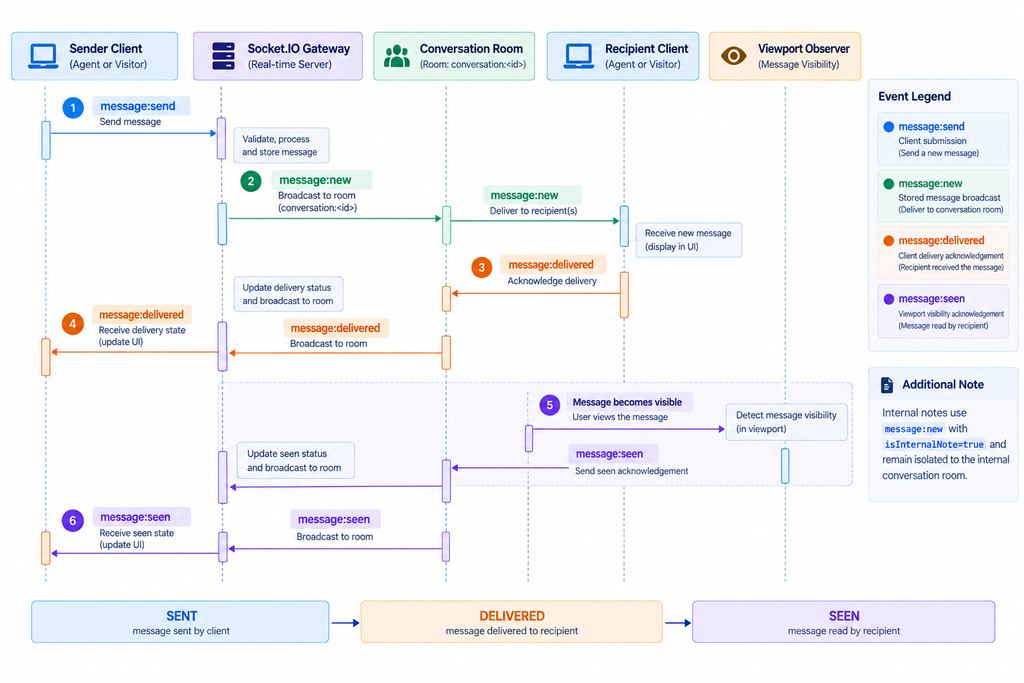
Figure RT-03 — Message delivery and two-stage read receipt flow.
Typing Indicators
The typing event provides temporary typing state.
{
“conversationId”: “<CONVERSATION_ID>”,
“userId”: “<USER_ID>”,
“isTyping”: true,
“at”: “2026-09-10T10:15:40.000Z”
}
Typing events are volatile and should not be treated as durable conversation data.
Need Help?
Email: support@ysdesk.com
Documentation: https://docs.ysplugins.com/ys-desk