Real-Time Connection & Authentication
YS Desk real-time connections use Socket.IO over WebSocket. Authentication is performed during the Socket.IO handshake, and the server validates the credentials before allowing the client to participate in workspace or visitor-scoped rooms.
Agent and Visitor clients use different authentication mechanisms.
Connection Endpoint & Transport
The standard Socket.IO connection path is:
Connections use the YS Desk API host and WebSocket transport.
const socket = io(“https://api.ysdesk.com”, {
path: “/socket.io”,
transports: [“websocket”],
});
The backend gateway enforces WebSocket transport.
Agent Authentication
Workspace Agent clients authenticate with an Auth0 access token.
A dashboard connection supplies the token and workspace/session context through the Socket.IO handshake:
import { io } from “socket.io-client”;
const chatSocket = io(“https://api.ysdesk.com”, {
path: “/socket.io”,
transports: [“websocket”],
auth: {
token: “<AUTH0_ACCESS_TOKEN>”,
workspaceId: “<WORKSPACE_ID>”,
sessionId: “<SESSION_ID>”,
},
});
The server verifies the Auth0 JWT through its JWT authentication layer, resolves the corresponding database user, and validates active Workspace membership before permitting access.
For the agent status namespace:
const userStatusSocket = io(“https://api.ysdesk.com/user-status”, {
path: “/socket.io”,
transports: [“websocket”],
query: {
token: “<AUTH0_ACCESS_TOKEN>”,
workspaceId: “<WORKSPACE_ID>”,
sessionId: “<SESSION_ID>”,
},
});
An Agent may participate in multiple Workspace rooms so background real-time state remains synchronized across Workspace memberships.
Visitor Authentication
Web Chat Visitors authenticate with a signed Visitor Session JWT.
The handshake contains the Visitor Session token and channel context:
import { io } from “socket.io-client”;
const visitorSocket = io(“https://api.ysdesk.com”, {
path: “/socket.io”,
transports: [“websocket”],
auth: {
visitorSession: “<VISITOR_SESSION_TOKEN>”,
channelToken: “<CHANNEL_TOKEN>”,
guestId: “<GUEST_ID>”,
conversationId: “<CONVERSATION_ID>”,
clientInstanceId: “<CLIENT_INSTANCE_ID>”,
clientPublicIp: “<CLIENT_PUBLIC_IP>”,
},
});
guestId and conversationId may be omitted when the corresponding context does not yet exist. The Visitor Session is verified by the server before the socket is accepted.
Authentication Context
| Client | Namespace | Credential | Primary scope |
| Agent | / | Auth0 JWT | Workspace |
| Agent | /user-status | Auth0 JWT | Workspace / session |
| Visitor | / | Visitor Session JWT + channel token | Channel / visitor |
The Agent connection also carries workspace and session identifiers. Visitor connections carry visitor session, channel, guest, conversation, and client-instance context as applicable.
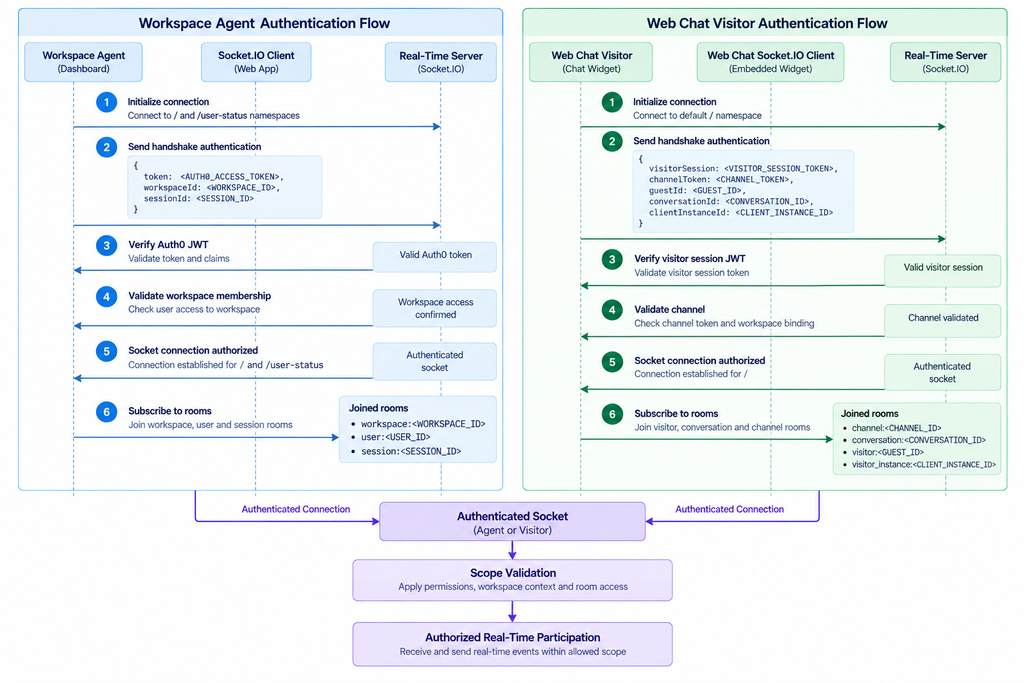
Figure RT-02 — Dual-track authentication flow for Workspace Agents and Web Chat Visitors.
Room Subscription Architecture
After authentication, clients subscribe to rooms representing their permitted real-time scope.
Typical scopes include:
workspace:<workspaceId>
channel:<channelId>
conversation:<conversationId>
visitor:<guestId>
visitor_instance:<clientInstanceId>
user:<userId>
session:<sessionId>
Conversation-specific internal events use:
conversation:<conversationId>:internal
This room is restricted to Agent-side participants and is used for internal notes.
Authentication & Authorization Failures
Invalid or unauthorized handshake credentials are rejected by the server. The client should treat the socket connection as unavailable and wait for valid authentication context before attempting normal real-time operations.
For authorization-sensitive state changes, YS Desk can also send permission and access-control events after a connection has already been established. Applications should therefore handle both connection-time rejection and runtime authorization changes.
Security Considerations
Never expose an Auth0 access token, Visitor Session token, or Channel Token in application logs, source control, screenshots, or public documentation.
A Channel Token identifies and authorizes the Web Chat channel. A Visitor Session token establishes the signed visitor session used by the real-time connection.
Use:
<AUTH0_ACCESS_TOKEN>
<VISITOR_SESSION_TOKEN>
<CHANNEL_TOKEN>
when showing examples.
Need Help?
Email: support@ysdesk.com
Documentation: https://docs.ysplugins.com/ys-desk