YS Desk does not use one pagination mechanism for every endpoint.
The implementation currently contains three pagination styles plus incremental message synchronization.
Cursor-Based Pagination
Cursor pagination is used by high-volume resources such as Conversations and Messages.
| Resource / Endpoint | Default `limit` | Maximum `limit` |
| `GET /conversations` | 20 | 50 |
| `GET /conversations/Myconversation` | 20 | 50 |
| `GET /conversations/closed` | 20 | 50 |
| `GET /conversations/:id/messages` | 20 | 100 |
| `GET /conversations/:id/messages/dashboard` | 20 | 100 |
| `GET /channels` | 10 | 50 |
| `GET /conversations/:id/assignment-history` | 10 | 50 |
Typical parameters:
cursor
Limit
Typical response fields:
hasMore
nextCursor
Example:
GET /conversations?limit=20
Next request:
GET /conversations?limit=20&cursor=<NEXT_CURSOR>
Typical response:
{
“conversations”: [],
“hasMore”: true,
“nextCursor”: “<NEXT_CURSOR>”
}
Cursor-based pagination is used by:
- /conversations
- /conversations/:id/messages
- /conversations/closed
- selected Channel operations
The default and maximum limits can vary by endpoint; do not assume one universal maximum.
Offset-Based Pagination
Administrative and list-oriented endpoints may use:
page
pageSize
Typical response fields include:
total
page
pageSize
| Resource / Endpoint | Page Indexing | Default `limit` | Maximum `limit` |
| `GET /auth/members` | 0-indexed | 10 | 100 |
| `GET /auth/Workspace/contacts` | 0-indexed | 10 | 100 |
| `GET /auth/Workspace/contacts/active` | 0-indexed | 10 | 100 |
| `GET /canned-responses/available/:userIdentifier` | 0-indexed | 10 | 100 |
| `GET /auth/inactive-members` | 0-indexed | 10 | 100 |
Examples include:
- /auth/members
- /auth/Workspace/contacts
- /canned-responses/available/:userIdentifier
- /auth/permissions/templates
Example:
GET /auth/members?page=0&pageSize=20
Skip/Take Pagination
Some audit-oriented endpoints use:
skip
take
Examples include:
- /auth/login-history
- /auth/permissions/:userId/history
Example:
GET /auth/login-history?skip=0&take=10
Incremental Message Synchronization
The Messages API supports incremental synchronization through:
GET /conversations/:id/messages/sync?sinceId=<MESSAGE_ID>
Or:
GET /conversations/:id/messages/sync?since=<ISO_TIMESTAMP>
The response contains the messages added after the specified point.
Filtering, Searching, and Sorting
Filtering parameters vary by resource.
Common patterns include:
search
sort
sortBy
sortOrder
status
channelId
agentId
startDate
endDate
Endpoint-specific pages define the exact supported parameters.
Do not apply parameters from one resource to another unless that endpoint explicitly supports them.
Pagination Model Comparison
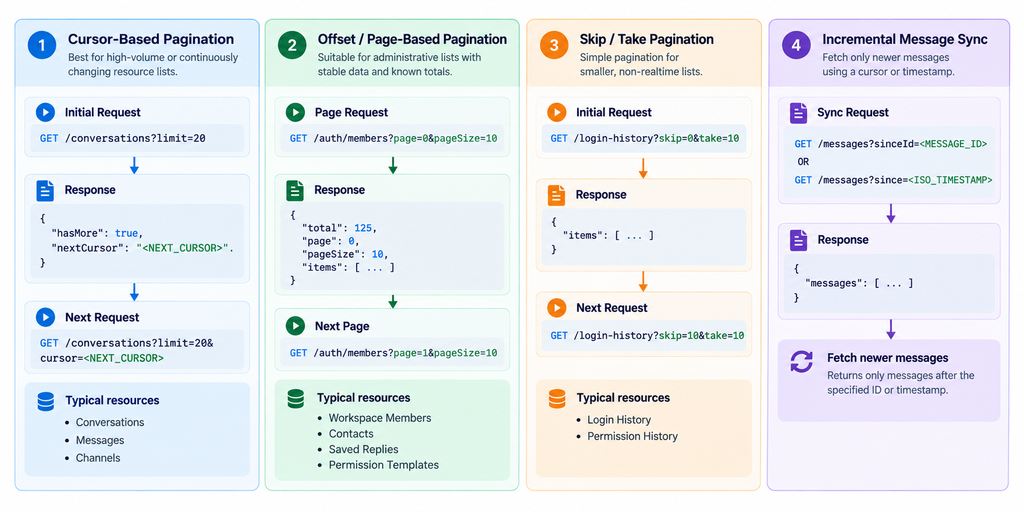
Figure REST-03 — Comparison between cursor-based pagination for high-volume resources and offset-based pagination for administrative lists.
The key distinction is:
| Model | Typical Use | Main Parameters |
| Cursor | Conversations, Messages | cursor, limit |
| Offset | Members, Contacts, Saved Replies | page, pageSize |
| Skip/Take | Audit History | skip, take |
| Incremental Sync | Message synchronization | sinceId, since |
Need Help?
Email: support@ysdesk.com
Documentation: https://docs.ysplugins.com/ys-desk