YS Desk REST access uses different authentication mechanisms depending on the type of client and operation.
Workspace Authentication
Workspace-facing API operations use an Auth0 RS256-signed JWT.
Send the token using:
Authorization: Bearer <AUTH0_ACCESS_TOKEN>
Workspace-scoped requests also use:
x-workspace-id: <WORKSPACE_ID>
The workspace identifier is validated against the authenticated user’s access and membership. Missing or unauthorized workspace context can result in 401 Unauthorized or 403 Forbidden.
Visitor Session Authentication
Web Chat Visitor operations use:
x-visitor-session: <VISITOR_SESSION_TOKEN>
The Visitor Session token is HMAC-SHA256 signed and is associated with the relevant Visitor Session, Guest, Channel, and Workspace.
Invalid Visitor Session
An expired, malformed, or tampered Visitor Session token returns `401 Unauthorized` with the following response:
“`json
{
“statusCode”: 401,
“errorCode”: “INVALID_VISITOR_SESSION”,
“message”: “Invalid visitor session”
}
Public Endpoints
Some operations are intentionally public, including selected bootstrap, validation, health, and Visitor-related endpoints.
Public access does not mean that every resource is globally accessible. Several public operations remain scoped through channel, conversation, guest, or session identifiers.
Authorization
Authentication establishes who is making the request. Authorization determines whether that caller is allowed to perform the operation.
YS Desk uses:
- role checks;
- granular permissions;
- owner-only checks;
- feature gates;
- workspace membership validation;
- seat-limit enforcement for selected member operations.
The documented roles are:
OWNER
ADMIN
AGENT
GUEST
SYSTEM
Permission checks are applied using codes such as:
conversation-list-view
conversation-access
conversation-assign-reassign
message-send
message-view
member-create
member-delete
channel-manage
guest-details-view
report-overview-view
The exact permission requirement depends on the endpoint.
Role-Based Access Control & Permission Enforcement
Workspace permissions determine which operations an authenticated Team Member can perform.
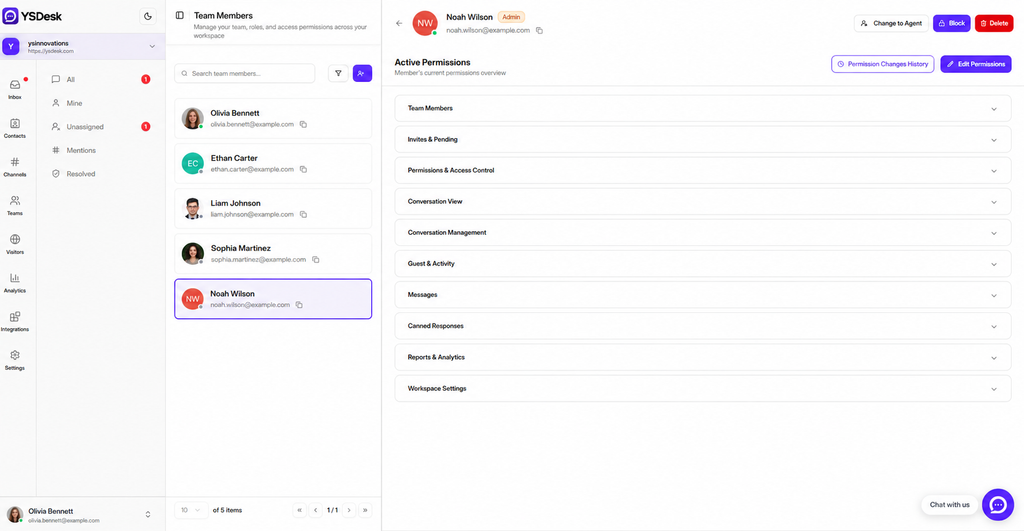
Figure REST-02 — YS Desk workspace permission management interface displaying granular permission grants mapped to REST API operations.
Redact:
- Team Member email addresses
- Auth0 identifiers
- access tokens
- private identifiers
Authentication Errors
Typical authentication and authorization failures are:
| Status | Meaning |
| 401 | Authentication missing, invalid, expired, or workspace/session context unavailable |
| 403 | Authenticated caller does not have the required permission, role, or feature access |
Need Help?
Email: support@ysdesk.com
Documentation: https://docs.ysplugins.com/ys-desk