Overview & Quickstart
YS Desk provides REST endpoints for workspace administration, conversations, messaging, channels, contacts, analytics, billing, permissions, and related platform operations.
The API does not use a global /api/v1 prefix. Route prefixes are defined by the individual controller, such as /auth, /conversations, /channels, /analytics, /visitors, /uploads, /media, /mentions, /canned-responses, /support, and /api/public.
Workspace-authenticated requests use an Auth0-issued JWT and workspace context:
Authorization: Bearer <AUTH0_ACCESS_TOKEN>
x-workspace-id: <WORKSPACE_ID>
Visitor-facing operations use a signed Visitor Session token:
x-visitor-session: <VISITOR_SESSION_TOKEN>
YS Desk does not expose a general-purpose developer API-key system such as sk_live_….
Base URL
Production:
Local development:
The production API is served through the YS Desk backend environment.
Request Format
JSON request bodies should use:
Content-Type: application/json
Successful responses use the HTTP status appropriate to the operation. Common success statuses are 200 OK, 201 Created, and 204 No Content.
Operational Health Check
The `GET /health` endpoint is an unauthenticated operational health probe. It is intended to verify the availability of core backend dependencies rather than serve as a general application integration endpoint.
It reports the current database and Redis connectivity state.
A healthy response returns `200 OK`. If the health check detects a database or Redis failure, the endpoint returns `503 Service Unavailable`.
A simple public health check:
curl -X GET “https://api.ysdesk.com/health“
Example response:
{
“status”: “ok”,
“redis”: “online”,
“database”: “online”,
“timestamp”: “2026-09-09T09:47:33.123Z”
}
The /health endpoint is public and returns database and Redis availability. A service failure can produce 503 Service Unavailable.
Quickstart
YS Desk has two primary API usage flows:
1. Web Chat / Visitor flow
2. Workspace / Agent flow
Web Chat / Visitor Quickstart
The Visitor flow begins by bootstrapping a Guest and obtaining a signed Visitor Session token.
Step 1 — Bootstrap the Visitor Session
POST /auth
Example:
curl -X POST “https://api.ysdesk.com/auth” \
-H “Content-Type: application/json” \
-d ‘{
“channelId”: “<CHANNEL_ID>”,
“name”: “Alex”,
“email”: “alex@example.com”
}’
The response provides a Visitor Session token. Use that token in the `x-visitor-session` header for authenticated Visitor operations.
x-visitor-session: <VISITOR_SESSION_TOKEN>
Step 2 — Create a Conversation
POST /conversations
Example:
curl -X POST “https://api.ysdesk.com/conversations” \
-H “Content-Type: application/json” \
-H “x-visitor-session: <VISITOR_SESSION_TOKEN>” \
-d ‘{
“channelId”: “<CHANNEL_ID>”,
“guestId”: “<GUEST_ID>”
}’
Workspace / Agent Quickstart
Workspace operations use an Auth0 access token and Workspace context.
curl -X GET “https://api.ysdesk.com/auth/members?page=0&pageSize=20” \
-H “Authorization: Bearer <AUTH0_ACCESS_TOKEN>” \
-H “x-workspace-id: <WORKSPACE_ID>”
Request Lifecycle & Architecture
The REST API request flow differs by caller:
- Workspace requests are authenticated with Auth0 JWTs and evaluated against Workspace membership and permissions.
- Visitor requests are authenticated with signed Visitor Session tokens.
- Public bootstrap endpoints may use a Channel Token.
- Workspace-scoped requests use x-workspace-id.
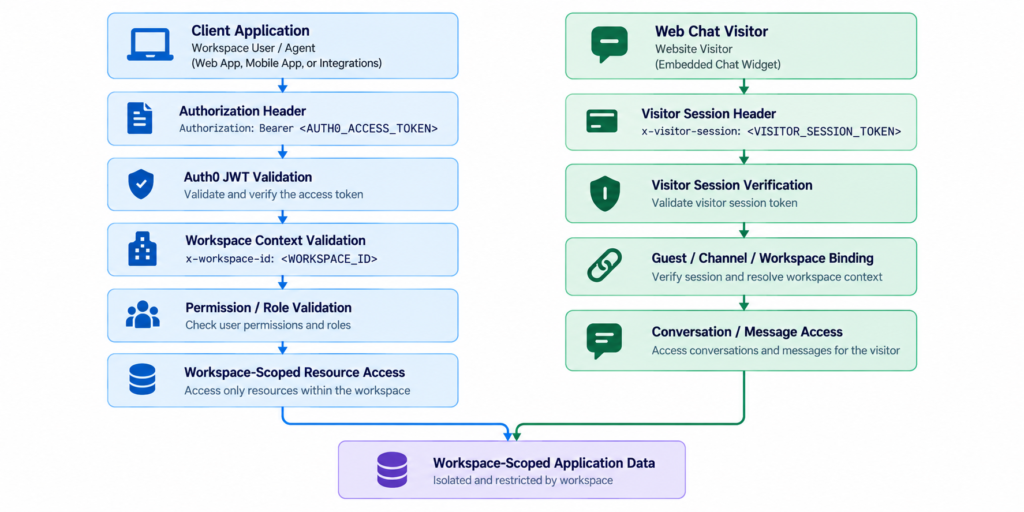
Figure REST-01 — High-level REST API request lifecycle showing Auth0 JWT validation, Visitor Session verification, and workspace-scoped data isolation.
Need Help?
Email: support@ysdesk.com
Documentation: https://docs.ysplugins.com/ys-desk