SDK Overview
The YS Desk Web Chat SDK provides a JavaScript interface for embedding Web Chat on a website and controlling its initialization, support-session context, and lifecycle.
The SDK exposes three public methods:
- run(config)
- applySupportSession(session)
- destroy()
The SDK also supports three public lifecycle callbacks:
- onReady
- onOpen
- onClose
Important: window.YSDeskSDK.identify() is not supported. Visitor identity must be provided through userEmail and userName in run(), or through a supportSession.
The SDK is available through window.YSDeskSDK.
For installation and adding the SDK script to your website, see [Web Chat → Installation].
SDK Loading and Command Queue
The Web Chat SDK supports asynchronous script loading. Commands issued before the SDK script has finished loading can be queued and processed after the SDK becomes available.
A standard initialization call uses:
window.YSDeskSDK(‘run’, {
token: ‘YOUR_CHANNEL_TOKEN’
});
The SDK stores commands issued before sdk.js finishes loading in window.YSDeskSDK.q and processes them in first-in, first-out (FIFO) order after the SDK becomes available.
The SDK also supports direct method-style invocation after the SDK has loaded:
window.YSDeskSDK.run({
token: ‘YOUR_CHANNEL_TOKEN’
});
Use the command-style form when initialization may occur before the SDK script has finished loading. Direct method-style calls should be used after the SDK has loaded.
Public Methods
run(config)
Initializes Web Chat using the supplied configuration and returns a promise that resolves when SDK initialization completes.
window.YSDeskSDK(‘run’, {
token: ‘YOUR_CHANNEL_TOKEN’
});
The same operation can be invoked directly after the SDK is available:
window.YSDeskSDK.run({
token: ‘YOUR_CHANNEL_TOKEN’
});
Return type: Promise<void>
The initialization process validates the supplied Channel Token, resolves the Web Chat channel configuration, mounts the Web Chat interface, creates the launcher, and triggers the onReady callback after initialization completes.
Initialization Requirements
The token configuration property is required.
An invalid token or unauthorized website domain prevents successful initialization.
For Channel Token setup and authorized website domains, see [Web Chat → Installation].
applySupportSession(session)
Applies an existing support session to a running Web Chat instance.
window.YSDeskSDK.applySupportSession({
guestId: ‘GUEST_ID’,
conversationId: ‘CONVERSATION_ID’,
channelId: ‘CHANNEL_ID’
});
Return type: void
The method updates the running widget with the supplied Guest and Conversation context.
It can be used when the host application obtains the support-session context after Web Chat has already been initialized.
The complete support-session structure and method behavior are defined here in the SDK Reference, while the conceptual identity model is covered in [Web Chat → Identity & Sessions].
destroy()
Destroys the current Web Chat SDK instance.
window.YSDeskSDK.destroy();
Return type: void
Destroying the SDK:
- removes the Web Chat iframe from the host page;
- removes the Web Chat launcher;
- resets the SDK’s in-memory initialization state.
destroy() does not:
- delete the Guest identity;
- clear the browser’s persisted Web Chat storage;
- delete backend Visitor Session records;
- act as a visitor logout operation.
destroy() is therefore different from Start New Conversation, which is a visitor action that resets the current Conversation context inside Web Chat.
The conceptual difference between these operations is documented in [Web Chat → Identity & Sessions].
Reinitialization After Destroy
After destroy() resets the SDK instance, the Web Chat SDK can be initialized again with run(config).
window.YSDeskSDK.destroy();
window.YSDeskSDK.run({
token: ‘YOUR_CHANNEL_TOKEN’
});
Configuration Reference
The public SDK configuration is defined through YSDeskSDKConfig.
| Property | Required | Type | Default | Description |
| token | Yes | string | None | Channel Token used to identify and authorize the Web Chat channel. |
| userEmail | No | string | undefined | Provides a known visitor email during SDK initialization. |
| userName | No | string | undefined | Provides a known visitor name during SDK initialization. |
| embeddedApp | No | boolean | false | Enables embedded application mode and presents a message-focused interface. |
| lazy | No | boolean | true | Defers Guest and Conversation creation until the visitor sends the first message. |
| supportSession | No | YSDeskSupportSession | undefined | Restores an existing Guest and Conversation context during initialization. |
| theme | No | YSDeskTheme | SDK defaults | Provides client-side fallback theme values. |
| launcher | No | object | { show: true } | Configures supported initial launcher behavior. |
| widgetBaseUrl | No | string | Production SDK URL | Specifies a custom base URL for loading the Web Chat widget. |
For detailed visitor identity behavior, see [Web Chat → Identity & Sessions].
For dashboard-based Web Chat configuration, see [Web Chat → Configuration].
token (Required)
The token identifies the Web Chat channel used by the SDK.
window.YSDeskSDK(‘run’, {
token: ‘YOUR_CHANNEL_TOKEN’
});
The Channel Token is required for initialization.
The SDK uses the token to resolve the channel configuration and validate whether the current website is authorized to use the channel.
Do not expose private application credentials or server-side secrets in client-side SDK configuration.
For obtaining and installing the Channel Token, see [Web Chat → Installation].
userEmail & userName
userEmail
Provides the visitor’s known email address during initialization.
window.YSDeskSDK(‘run’, {
token: ‘YOUR_CHANNEL_TOKEN’,
userEmail: ‘alex.morgan@example.com’
});
When supplied, Web Chat can use the email to associate the visitor with an existing Guest in the Workspace or establish the visitor’s Guest identity.
userName
Provides the visitor’s known name during initialization.
window.YSDeskSDK(‘run’, {
token: ‘YOUR_CHANNEL_TOKEN’,
userName: ‘Alex Morgan’
});
userName can be supplied together with userEmail:
window.YSDeskSDK(‘run’, {
token: ‘YOUR_CHANNEL_TOKEN’,
userEmail: ‘alex.morgan@example.com’,
userName: ‘Alex Morgan’
});
The SDK does not expose a standalone identify() method.
The following is not supported:
window.YSDeskSDK.identify();
For the conceptual relationship between Visitors, Guests, Visitor Sessions, and Conversations, see [Web Chat → Identity & Sessions].
embeddedApp
Set embeddedApp to true when Web Chat is embedded inside an application where the host application already knows the visitor’s identity.
window.YSDeskSDK(‘run’, {
token: ‘YOUR_CHANNEL_TOKEN’,
userEmail: ‘alex.morgan@example.com’,
embeddedApp: true
});
When enabled, Web Chat uses the embedded application mode and hides the standard Name and Email fields from the initial interface.
Identity should be supplied by the host application through the supported SDK configuration or support-session flow.
lazy
The lazy option controls when Guest and Conversation creation occurs.
window.YSDeskSDK(‘run’, {
token: ‘YOUR_CHANNEL_TOKEN’,
lazy: true
});
By default, lazy is true.
When lazy initialization is enabled, Web Chat defers Guest and Conversation creation until the visitor sends the first message.
This allows the widget to initialize without immediately creating a persistent Conversation for every visitor who opens Web Chat.
supportSession
A supportSession restores an existing Guest and Conversation context during SDK initialization.
window.YSDeskSDK(‘run’, {
token: ‘YOUR_CHANNEL_TOKEN’,
supportSession: {
guestId: ‘GUEST_ID’,
conversationId: ‘CONVERSATION_ID’,
channelId: ‘CHANNEL_ID’,
currentStatus: ‘OPEN’
}
});
The supported structure includes:
| Property | Required | Type | Description |
| guestId | Yes | string | Identifies the Guest to restore. |
| conversationId | Yes | string | Identifies the Conversation to restore. |
| channelId | Yes | string | Identifies the Web Chat channel associated with the session. |
| currentStatus | No | string | Provides the current Conversation status when available. |
| channelToken | No | string | Optional channel token associated with the support session. |
interface YSDeskSupportSession {
guestId: string;
conversationId: string;
channelId: string;
currentStatus?: string | null;
channelToken?: string;
}
A support session can bypass the standard pre-chat identity capture flow and restore the supplied Conversation context directly.
For the conceptual behavior of support sessions, see [Web Chat → Identity & Sessions].
theme
The theme configuration provides client-side fallback values for supported Web Chat visual properties.
interface YSDeskTheme {
primaryColor?: string;
launcherPosition?:
| ‘bottom-right’
| ‘bottom-left’
| ‘top-right’
| ‘top-left’;
sideOffset?: number;
bottomOffset?: number;
darkMode?: boolean;
}
A theme configuration can provide values such as:
- primaryColor
- launcherPosition
- sideOffset
- bottomOffset
- darkMode
Example:
window.YSDeskSDK(‘run’, {
token: ‘YOUR_CHANNEL_TOKEN’,
theme: {
primaryColor: ‘#582AF5’,
launcherPosition: ‘bottom-right’,
sideOffset: 20,
bottomOffset: 20,
darkMode: false
}
});
The SDK does not treat these client-side values as an unconditional override.
Dashboard channel settings take precedence over SDK theme fallback values when channel configuration is available.
For dashboard appearance and Web Chat configuration, see [Web Chat → Configuration].
launcher
The launcher configuration controls supported initial launcher behavior.
Example:
window.YSDeskSDK(‘run’, {
token: ‘YOUR_CHANNEL_TOKEN’,
launcher: {
show: true,
tooltip: ‘Chat with us’
}
});
The verified SDK-level launcher configuration includes:
| Property | Type | Description |
| show | boolean | Controls whether the launcher is initially displayed. |
| tooltip | string | Provides launcher tooltip text. |
| iconUrl | string | Provides a custom launcher icon URL when supported. |
Detailed launcher appearance, positioning, animations, aesthetic styles, and spacing controls belong in [Web Chat → Launcher].
The SDK does not expose standalone open(), close(), show(), or hide() methods.
widgetBaseUrl (Advanced)
The widgetBaseUrl option allows an advanced integration to provide a custom base URL for loading Web Chat widget assets.
window.YSDeskSDK(‘run’, {
token: ‘YOUR_CHANNEL_TOKEN’,
widgetBaseUrl: ‘https://example.com’
});
Use this option only when the integration requires a custom widget hosting location.
Lifecycle Callbacks
The SDK supports three public lifecycle callbacks:
- onReady
- onOpen
- onClose
onReady
Called after the SDK has successfully validated the channel, resolved configuration, and mounted the Web Chat interface and launcher.
window.YSDeskSDK(‘run’, {
token: ‘YOUR_CHANNEL_TOKEN’,
onReady: () => {
console.log(‘YS Desk Web Chat is ready’);
}
});
onOpen
Called when the Web Chat interface is opened, including when the visitor opens it through the launcher.
window.YSDeskSDK(‘run’, {
token: ‘YOUR_CHANNEL_TOKEN’,
onOpen: () => {
console.log(‘Web Chat opened’);
}
});
onClose
Called when the Web Chat interface is closed or minimized.
window.YSDeskSDK(‘run’, {
token: ‘YOUR_CHANNEL_TOKEN’,
onClose: () => {
console.log(‘Web Chat closed’);
}
});
The SDK does not provide onMessage or onError configuration callbacks.
Unsupported SDK Methods
The following methods are not part of the public SDK:
window.YSDeskSDK.identify();
window.YSDeskSDK.open();
window.YSDeskSDK.close();
window.YSDeskSDK.show();
window.YSDeskSDK.hide();
window.YSDeskSDK.reset();
Do not build integrations around these unsupported methods.
Configuration Precedence
When a Web Chat channel has dashboard configuration available, the effective runtime configuration can be influenced by both dashboard settings and SDK-provided fallback values.
For visual configuration, the effective precedence is:
Dashboard Channel Settings → SDK Configuration → SDK Defaults
SDK configuration values act as fallbacks for properties that are not overridden by dashboard channel settings.
This is particularly relevant for:
- primary color
- launcher position
- spacing
- dark mode
- other supported visual fallback values
For dashboard-managed configuration, see [Web Chat → Configuration].
For launcher-specific settings, see [Web Chat → Launcher].
Error and Validation Handling
| Scenario | Runtime behavior | Developer-visible message |
| Missing Token | Initialization is aborted immediately and the Web Chat is not mounted. | [YSDesk SDK] Channel token is required. |
| Invalid or inactive Token | Initialization stops and the Web Chat is not mounted. | [YSDesk SDK] Failed to validate channel token. |
| Unauthorized Domain | Initialization stops because the current website origin is not authorized for the channel. | [YSDesk SDK] Domain is not authorized for this channel token. |
| Duplicate run() | The additional initialization attempt is ignored. | [YSDesk SDK] SDK is already initialized. Use applySupportSession() to switch sessions or destroy() first. |
| Invalid Support Session | The supplied session is rejected and the active widget context is not updated. | [YSDesk SDK] Invalid support session object. guestId, conversationId, and channelId are required. |
For installation and authorized website domain troubleshooting, see [Web Chat → Installation].
SDK Initialization and Runtime Lifecycle
- The host page loads the Web Chat installation snippet.
- window.YSDeskSDK(‘run’, config) is queued.
- sdk.js loads and processes queued commands.
- The SDK validates the Channel Token and authorized website origin.
- Channel configuration is resolved.
- Dashboard settings and SDK fallback configuration are applied according to configuration precedence.
- The Web Chat launcher and interface are mounted.
- onReady() is invoked.
- Opening Web Chat invokes onOpen().
- Closing or minimizing Web Chat invokes onClose().
- applySupportSession() can update the active support context.
- destroy() removes the Web Chat instance and resets SDK in-memory state.
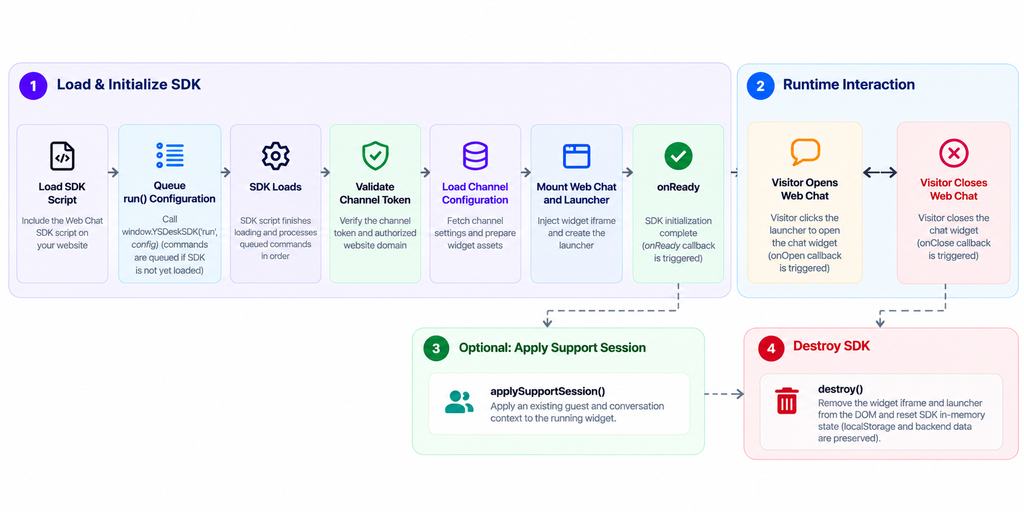
Figure WC-20 — Web Chat SDK initialization and runtime lifecycle.
Code Examples
1. Standard Channel Initialization
The standard initialization requires only the Channel Token.
window.YSDeskSDK(‘run’, {
token: ‘YOUR_CHANNEL_TOKEN’
});
The same initialization can be called directly after the SDK has loaded:
window.YSDeskSDK.run({
token: ‘YOUR_CHANNEL_TOKEN’
});
2. Pre-authenticated Visitor Initialization
window.YSDeskSDK(‘run’, {
token: ‘YOUR_CHANNEL_TOKEN’,
userEmail: ‘alex.morgan@example.com’,
userName: ‘Alex Morgan’
});
3. Embedded Application Mode
window.YSDeskSDK(‘run’, {
token: ‘YOUR_CHANNEL_TOKEN’,
userEmail: ‘alex.morgan@example.com’,
embeddedApp: true
});
4. Resuming Support Session via Initialization
window.YSDeskSDK(‘run’, {
token: ‘YOUR_CHANNEL_TOKEN’,
supportSession: {
guestId: ‘GUEST_ID’,
conversationId: ‘CONVERSATION_ID’,
channelId: ‘CHANNEL_ID’,
currentStatus: ‘OPEN’
}
});
5. Dynamic Session Switch via applySupportSession()
window.YSDeskSDK.applySupportSession({
guestId: ‘GUEST_ID’,
conversationId: ‘CONVERSATION_ID’,
channelId: ‘CHANNEL_ID’,
currentStatus: ‘OPEN’
});
6. Lifecycle Monitoring with Callbacks
window.YSDeskSDK(‘run’, {
token: ‘YOUR_CHANNEL_TOKEN’,
onReady: () => {
console.log(‘YS Desk Web Chat is ready’);
},
onOpen: () => {
console.log(‘Web Chat opened’);
},
onClose: () => {
console.log(‘Web Chat closed’);
}
});
7. Complete SDK Teardown
window.YSDeskSDK.destroy();
After destroy() completes, the SDK can be initialized again with run(config).
Important
Do not mix applySupportSession() examples into the Standard Channel Initialization section.
That is the main structural defect in the current page.
Security Considerations
The Channel Token identifies the Web Chat channel and authorizes the SDK to initialize the configured Web Chat experience.
Do not expose private application credentials, signing secrets, workspace authentication credentials, or backend secrets in client-side SDK configuration.
Website authorization is enforced for the configured Web Chat channel. An unauthorized website cannot successfully initialize the channel.
The SDK manages communication between the host page and Web Chat internally. Integrations do not need to implement the widget’s internal messaging mechanism directly.
Need Help?
Email: support@ysdesk.com
Documentation: https://docs.ysplugins.com/ys-desk