Configure workspace-level language and regional preferences to keep YS Desk consistent with your team’s preferred interface language, date notation, time notation, and currency.
These settings apply at the workspace level.
Overview
Language & Regional Formatting contains four settings:
| Setting | Purpose | Default |
| Interface Language | Sets the default language used by workspace administrative interfaces. | English (US) |
| Date Format | Controls how dates are displayed. | DD/MM/YYYY |
| Time Format | Controls how times are displayed. | 12-hour (AM/PM) |
| Currency | Defines the default currency representation used by supported workspace financial views. | INR (₹) |
Where to Find Language & Regional Settings
You can manage these settings from the dedicated Language & Region page or from the consolidated Workspace Information page.
For the main workspace settings experience, go to:
Settings → Workspace Settings → Workspace Information
The consolidated page displays these preferences under Regional Standard.
Configuring Language & Regional Preferences
The dedicated Language & Region page provides four dropdown controls for configuring workspace regional preferences.
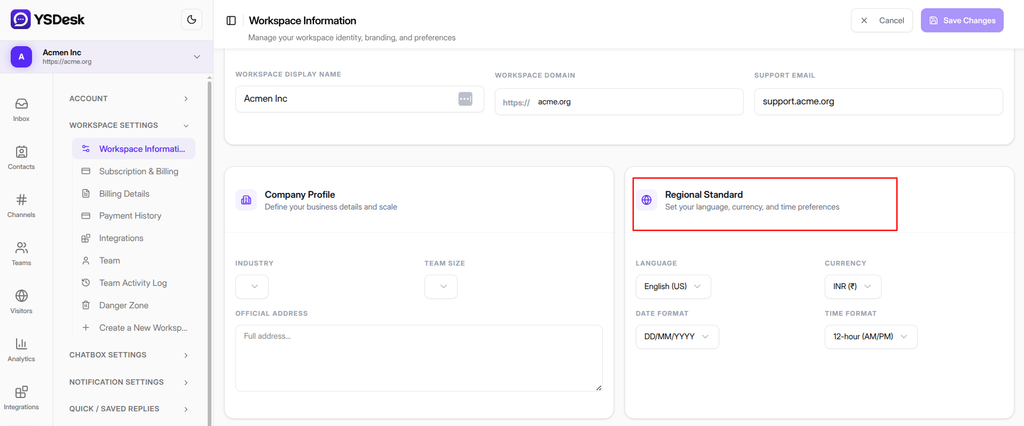
Figure SS-POSTONB-LANG-01 — Configuring Interface Language, Date Format, Time Format, and Currency in YS Desk.
Interface Language
The Interface Language setting controls the default language used by supported workspace administrative interfaces.
Available options are:
English (US)
English (UK)
Spanish
French
German
Chinese
Japanese
The default value is English (US).
Date Format
The Date Format setting controls the date notation used by supported workspace views.
Available options are:
DD/MM/YYYY
MM/DD/YYYY
YYYY-MM-DD
The default value is DD/MM/YYYY.
Time Format
The Time Format setting controls whether supported time values are displayed using a 12-hour or 24-hour notation.
Available options are:
12-hour (AM/PM)
24-hour
The default value is 12-hour (AM/PM).
Currency
The Currency setting defines the default currency representation used by supported workspace financial views.
Available options are:
INR (₹)
USD ($)
EUR (€)
GBP (£)
JPY (¥)
The default value is INR (₹).
Editing Regional Settings
The Language & Region page opens in a read-only state.
Select Edit Settings to enable editing.
When editing mode is active:
- The Editing Mode indicator is displayed.
- All four dropdown controls become editable.
- Cancel and Save Changes actions become available.
Select the appropriate values for your workspace.
Saving Changes
After changing one or more regional settings, select Save Changes.
YS Desk displays a confirmation dialog before applying the changes.
The confirmation dialog uses the title:
Save Changes
The save action remains unavailable when there are no changes to save.
While changes are being saved, the action displays a loading state.
After a successful save, YS Desk updates the workspace regional preferences, refreshes the current workspace state, displays a success notification, and exits editing mode.
Canceling Changes
Select Cancel to leave editing mode.
When no values have been modified, editing mode closes immediately.
When unsaved changes exist, YS Desk displays a Discard Changes confirmation dialog.
Select Keep Editing to continue working with the current changes.
Select Discard Changes to restore the previously saved values and exit editing mode.
Unsaved Changes Protection
YS Desk protects unsaved regional preference changes from accidental navigation.
When there are uncommitted changes:
- In-app navigation is intercepted and a discard confirmation is displayed.
- Browser navigation, refresh, or tab close triggers the browser’s native unsaved-changes warning.
Access Requirements
Language & Regional Formatting settings require the OWNER role.
Users without the required workspace ownership privileges cannot edit these settings.
Workspace-Level Defaults
Language and regional preferences are configured at the workspace level.
The settings provide shared defaults for supported workspace interfaces and formatting behavior.
Individual agent preferences and Web Chat visitor locale behavior are separate concerns and are not configured from this page.
Expected Result
After saving the regional preferences:
- The selected language, date format, time format, and currency values are stored as the workspace’s current preferences.
- The updated values are displayed when the settings are opened again.
- Editing mode closes.
- A success notification confirms that the changes were saved.
Need Help?
Email: support@ysdesk.com
Documentation: https://docs.ysplugins.com/ys-desk