Architecture Overview
YS Desk uses a layered integration model that separates the customer-facing Web Chat experience from the support workspace and the interfaces used to communicate with the platform.
A website or web application can use the Web Chat SDK to provide the customer-facing chat experience. The SDK initializes the configured Web Chat channel, establishes a visitor session, and connects the visitor to YS Desk for conversation and messaging.
The YS Desk Workspace provides the support environment where agents manage conversations and respond to visitors.
YS Desk also provides REST and Socket.IO interfaces used by the Web Chat experience, the YS Desk Workspace, and supported integrations. The current implementation also supports inbound billing webhooks from Razorpay and PayPal.
At a high level:
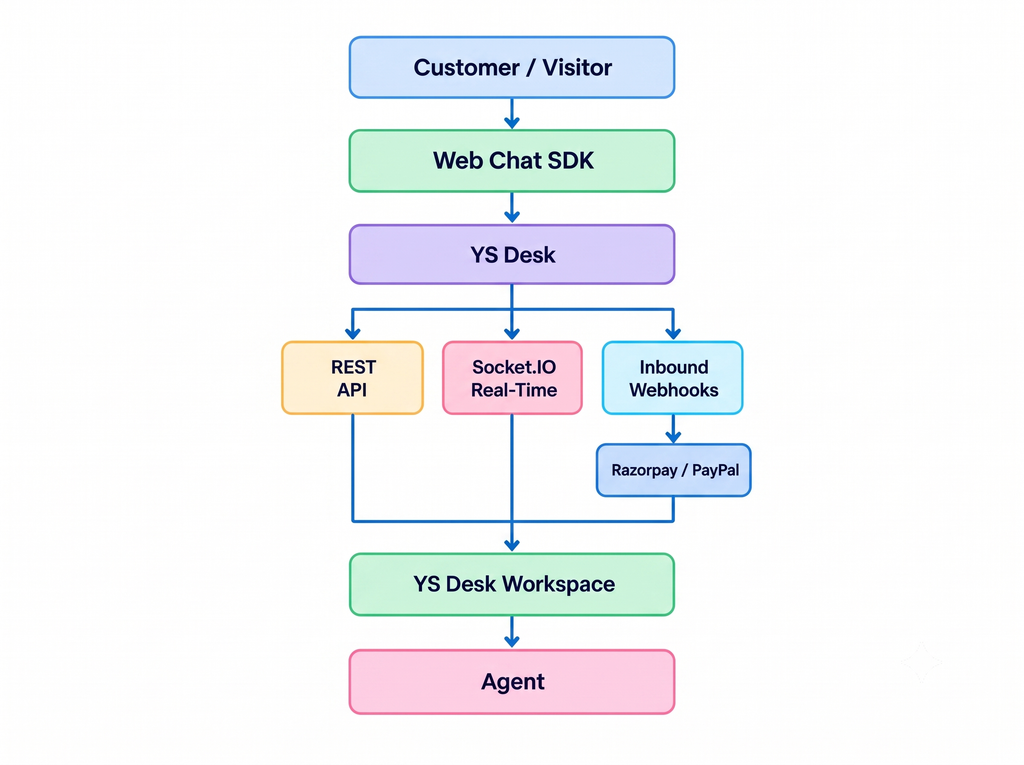
The purpose of this architecture is to provide separate interfaces for customer-facing communication, workspace operations, real-time updates, and supported external event processing.
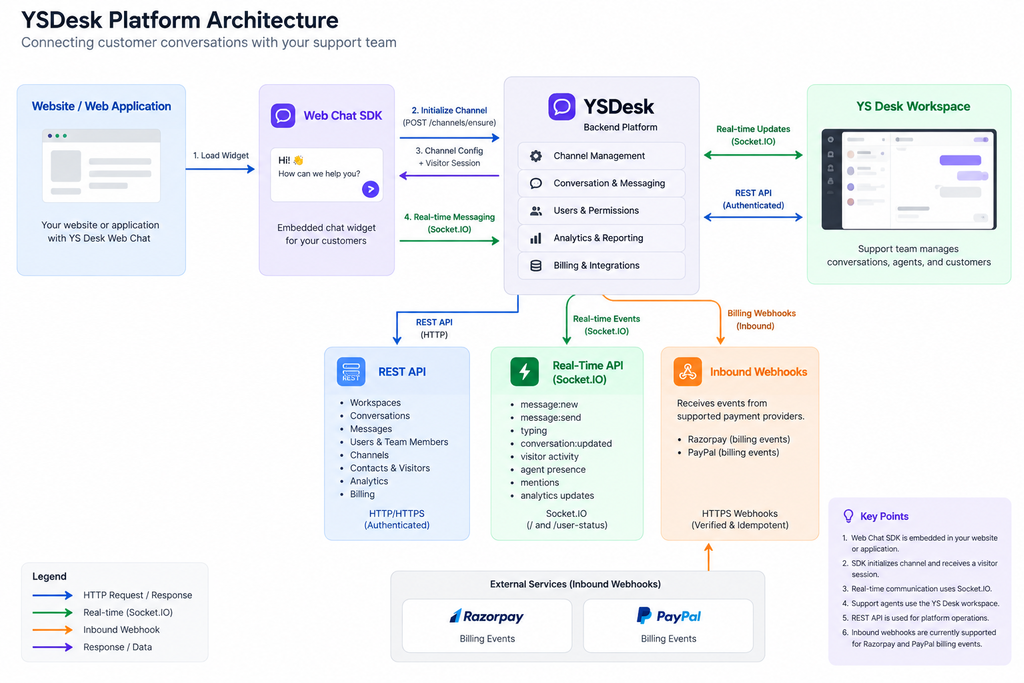
Figure ARCH-01 — High-level YS Desk architecture showing the Web Chat SDK, YS Desk Workspace, REST API, Socket.IO real-time layer, and inbound billing webhook integrations.
Platform Components
YS Desk Workspace
The YS Desk Workspace is the primary environment used by support teams to manage customer conversations and workspace operations.
Agents can work with conversations, messages, assignments, customer information, channels, and other supported workspace functionality from the application.
The workspace represents the operational side of YS Desk, while the Web Chat SDK provides the customer-facing communication experience.
Web Chat SDK
The Web Chat SDK provides the customer-facing Web Chat experience for websites and web applications.
The SDK initializes a configured channel, obtains the required visitor session, loads the Web Chat widget, and supports customer interactions such as messaging and other supported Web Chat functionality.
See [Web Chat → Installation] for the integration process.
REST API
The REST API provides HTTP interfaces used by the YS Desk Workspace, Web Chat flows, visitor/session operations, and supported integrations.
The current implementation includes resources for areas such as workspaces, users and team members, channels, conversations, messages, contacts and visitors, analytics, billing, and other supported platform operations.
Protected operations use the authentication mechanism required by the client and operation. Public endpoints are limited to specific channel bootstrap and validation functionality. A generic public REST API with long-lived developer API keys is not currently exposed.
See [REST API] for endpoint definitions and authentication requirements.
Real-Time API
The Real-Time API provides bidirectional communication through Socket.IO.
The root namespace / is used for Web Chat and conversation-related communication, including messages, typing, read receipts, unread counts, and visitor activity.
The /user-status namespace is used by the YS Desk Workspace for agent presence and related workspace state.
See [Real-Time] for connection, namespace, event, and payload documentation.
Webhooks
YS Desk currently supports inbound billing webhooks from Razorpay and PayPal.
External payment providers send supported subscription and payment events to YS Desk, where the events are verified and processed.
YS Desk does not currently expose outbound webhooks for conversation or message events.
See [Webhooks] for supported events, verification, and idempotency requirements.
End-to-End Communication Flow
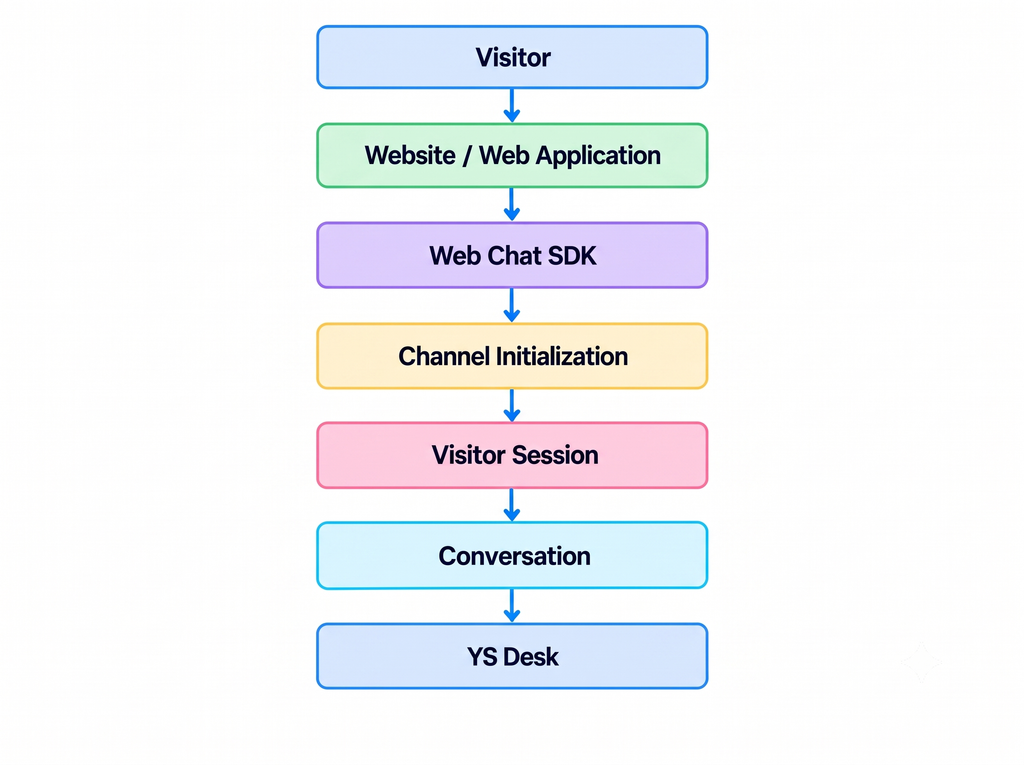
Visitor to YS Desk
A visitor interacts with the Web Chat experience embedded in a website or web application.
The Web Chat SDK initializes the configured channel and establishes a signed visitor session. The widget then creates or resumes the visitor’s conversation and connects to YS Desk through Socket.IO for real-time communication.
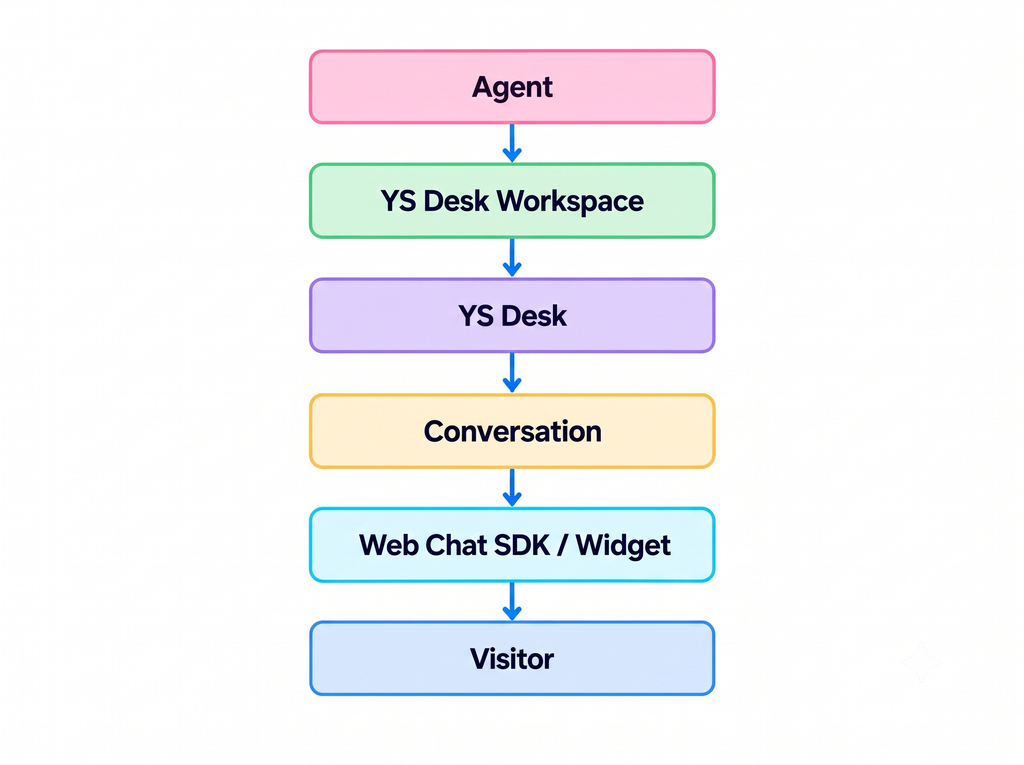
Agent to Visitor
When an agent responds, the message is processed by YS Desk and delivered to the visitor through the Web Chat conversation.
Real-Time Updates
Socket.IO allows connected clients to receive supported updates as they occur without repeatedly polling the REST API.
These updates include message events, conversation changes, typing activity, delivery and seen receipts, unread counts, visitor activity, mentions, and live analytics events.
The root namespace / handles conversation and messaging traffic, while /user-status is dedicated to agent presence and related workspace state.
Integration Model
Client-Side Integration
Use client-side integration when functionality runs in the customer’s browser.
The primary integration surface is the Web Chat SDK.
Typical use cases include:
- Embedding Web Chat
- Managing visitor sessions
- Sending customer messages
- Receiving supported client-side events
- Customizing the customer-facing chat experience
See [Web Chat] for complete client-side integration documentation.
Workspace Integration
The YS Desk Workspace uses the platform’s protected REST and real-time interfaces to provide the agent experience.
REST operations are used for supported workspace data and operations, while Socket.IO provides live conversation and workspace updates.
See [REST API] and [Real-Time].
Server-Side Integration
The current REST API should not be presented as a generic public backend-to-backend API with developer API keys.
Supported REST operations use the authentication model required by the implementation, including authenticated workspace access and visitor-session authentication. Specific public endpoints are available for channel bootstrap and validation.
Event-Driven Integration
YS Desk provides two different event mechanisms:
Real-Time API — live client communication through Socket.IO.
Webhooks — currently supported for inbound billing-provider events from Razorpay and PayPal.
These mechanisms serve different integration requirements and should not be treated as interchangeable.
Choosing the Right Integration Surface
| Requirement | Integration Surface |
| Add customer-facing Web Chat | [Web Chat] |
| Work with supported HTTP operations | [REST API] |
| Receive live conversation and workspace updates | [Real-Time] |
| Process supported billing-provider events | [Webhooks] |
| Follow an end-to-end implementation | [Guides] |
| Look up exact technical definitions | [Reference] |
Use the Web Chat SDK when the integration begins in the customer’s browser.
Use the REST API when your application needs supported HTTP operations exposed by YS Desk.
Use the Real-Time API when your application needs live updates.
Use Webhooks when processing supported inbound external events.
Public vs Internal Boundaries
Public documentation should describe the interfaces and behavior required to integrate with YS Desk without exposing private platform infrastructure.
Do not document internal database configuration, Redis topology or credentials, AWS credentials or infrastructure details, Auth0 client secrets, webhook secrets, private recovery endpoints, or internal diagnostic tooling.
The architecture documentation should focus on how clients and supported integrations communicate with YS Desk, rather than how the private infrastructure is deployed.
Need Help?
Email: support@ysdesk.com
Documentation: https://docs.ysplugins.com/ys-desk