What is YS Desk?
YS Desk is a customer support platform for managing customer conversations, support agents, contacts, communication channels, and real-time interactions from a centralized workspace.
It provides the tools and integration interfaces required to connect customer communication with support operations. Developers can integrate YS Desk with websites and web applications using the Web Chat SDK and supported platform interfaces.
YS Desk separates the customer-facing communication layer from the support workspace, allowing visitors to communicate through Web Chat while support teams manage conversations, assignments, messages, and customer information from the YS Desk workspace.
What You Can Build with YS Desk
YS Desk provides several integration surfaces that can be used independently or together depending on the integration requirements.
Web Chat SDK
The Web Chat SDK allows you to add a customer-facing Web Chat experience to a website or web application.
It provides the client-side functionality required for visitor sessions, messaging, media interactions, feedback, and other supported Web Chat capabilities.
See [Web Chat] for installation, configuration, SDK methods, events, and integration examples.
REST API
The REST API provides HTTP interfaces used by the YS Desk Workspace, Web Chat integration flows, visitor/session operations, and supported platform integrations.
It provides operations for areas such as workspaces, users and team members, channels, conversations, messages, contacts and visitors, analytics, billing, and other supported resources.
See [REST API] for endpoint documentation and authentication requirements.
Real-Time API
The Real-Time API provides real-time communication through Socket.IO.
It supports live functionality such as message updates, conversation updates, typing activity, presence, visitor activity, mentions, live analytics, and workspace updates.
See [Real-Time] for connection details, namespaces, events, and payloads.
Webhooks
YS Desk currently supports inbound webhook processing for supported billing providers, including Razorpay and PayPal.
These webhooks allow YS Desk to receive and process billing and subscription events from supported payment providers.
Outbound webhooks for customer conversation or message events are not currently exposed.
See [Webhooks] for supported webhook events, verification, retries, and idempotency.
Guides
Guides provide complete implementation workflows for common YS Desk integration scenarios.
They combine product configuration, SDK usage, API operations, and real-time functionality into practical end-to-end implementation steps.
Reference
Reference documentation provides exact technical definitions for YS Desk APIs, SDK functionality, events, objects, permissions, enums, and status values.
Use the Reference section when you need precise technical details for an implementation.
How YS Desk Works
A typical customer interaction begins when a visitor interacts with the Web Chat experience on an integrated website or application.
The Web Chat SDK initializes the configured channel and establishes the visitor session required for the interaction. The visitor can then create or resume a conversation and exchange messages with the support team.
The support agent manages the conversation from the YS Desk workspace. Agent responses are delivered back to the visitor through the connected Web Chat experience.
Customer Interaction
A customer or visitor starts a conversation through the Web Chat experience embedded in the website or application.
Conversation Management
The interaction is received by YS Desk and associated with a conversation. The conversation can then be viewed, managed, assigned, and updated within the workspace.
Agent Response
A support agent handles the conversation from the YS Desk workspace and sends a response to the customer.
Typical Flow
Use the flow diagram here:
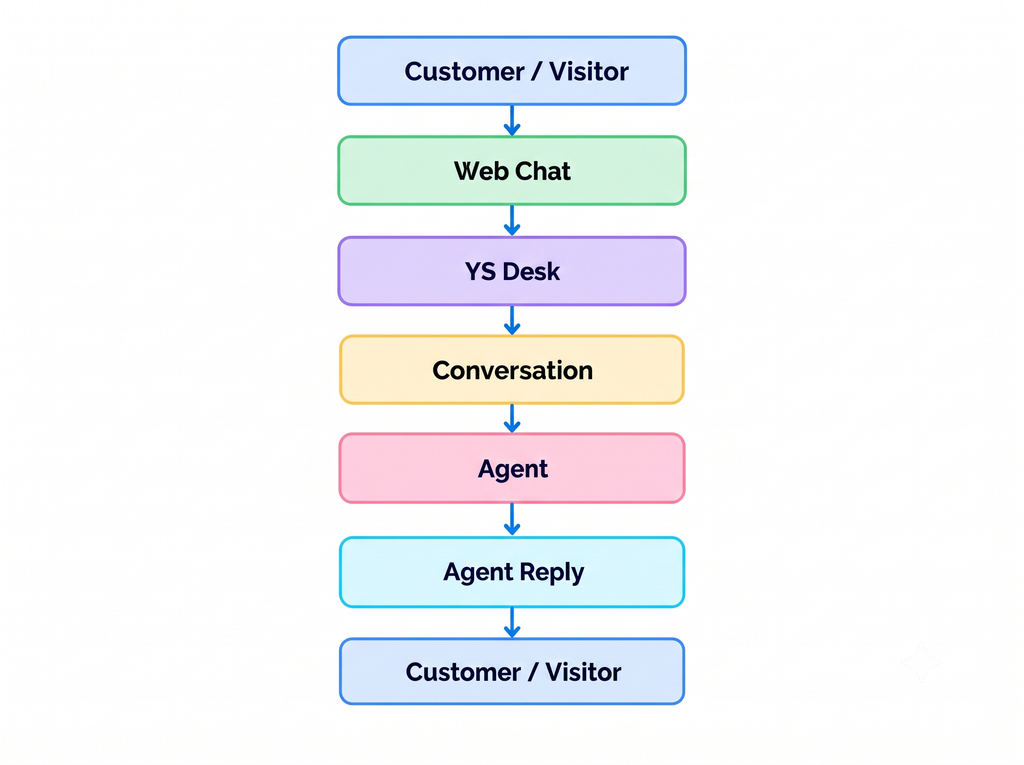
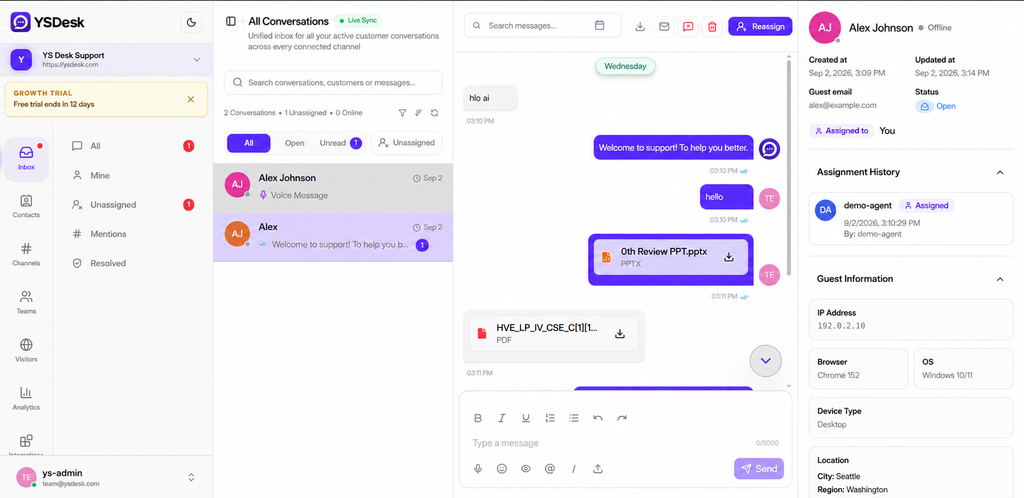
Figure GS-01 — YS Desk workspace showing the primary environment for managing customer conversations and customer information.
Who Should Use These Docs?
The YS Desk documentation is intended for developers, integration teams, and workspace administrators working with the platform.
Frontend Developers
Use these docs when integrating the YS Desk Web Chat experience into websites and web applications.
Backend Developers
Use these docs when working with supported YS Desk HTTP operations, authentication, or webhook processing.
Full-Stack Developers
Use these docs when an integration requires client-side Web Chat functionality together with REST API and real-time communication.
Integration Developers
Use these docs when building custom applications, internal tools, or other systems that interact with supported YS Desk interfaces.
Workspace Administrators
Use the Getting Started and workspace configuration documentation to configure workspaces, channels, team members, automation, and other supported settings.
Technical Teams
Use the documentation when preparing, validating, and deploying a YS Desk integration for production use.
Need Help?
Email: support@ysdesk.com
Documentation: https://docs.ysplugins.com/ys-desk