
Installation
Learn how to install and activate the Hyoka Product Reviews plugin in your WordPress site
This article assumes that you have already purchased the Hyoka Product Reviews plugin from our site and downloaded the Hyoka Product Reviews plugin zip file.
Haven’t yet purchased the Hyoka – PRO ? Get Hyoka PRO
Downloading the Hyoka Plugin
There are two ways you can get the Hyoka plugin:
1. Purchase Confirmation email : We send this email as soon as you have purchased. The email contains the link to download the latest version of the Hyoka plugin and the license key.
2. Your Hyoka Account page : Please go to My Account page. Login with your email address and password. Once logged into the My Account page, you will be able to download the latest version of the plugin and also get the license key.
[ Image -viswa]
Installation and Activation
If you have not yet purchased the plugin, please Click Here to purchase and download the plugin.
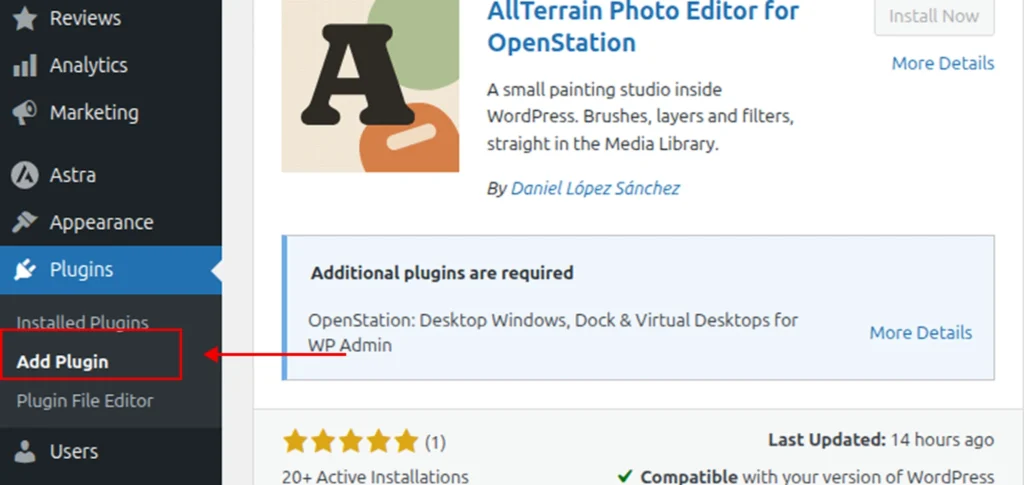
1. Please go to your WordPress dashboard -> Plugins -> Add Plugin.
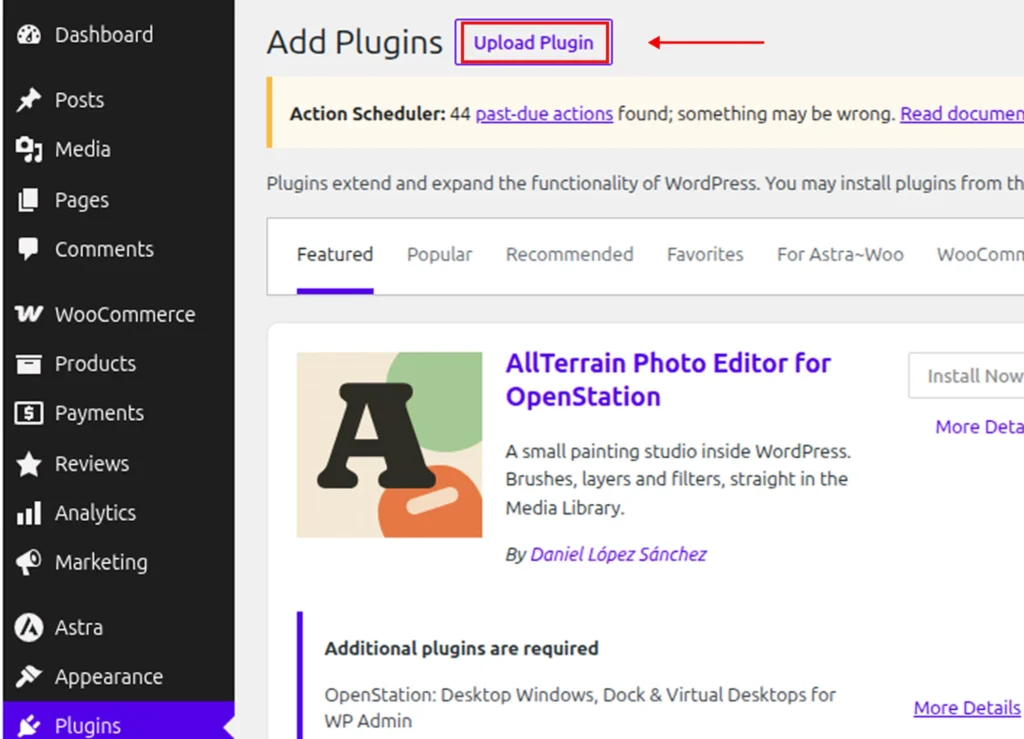
2. Click on the “Upload Plugin” button on the top.
3. Use the Browse option and point the downloaded Hyoka plugin zip file ( hyoka-productreviews-pro.zip ).
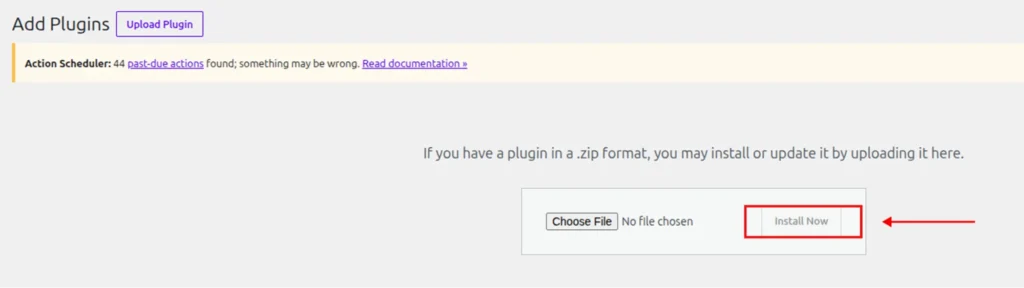
4. Click Install Now
5. Finally, click the Activate Plugin button.
Once done, you will be able to view the “Hyoka” menu on your left sidebar.
Updates
Learn how to update Hyoka – Customer Reviews, Product Reviews, Photo & Video UGC & Loyalty for WooCommerce plugin in your site
Haven’t yet purchased the Hyoka – PRO ? Get Hyoka PRO
Hyoka Product Reviews is under active development. We regularly release updates to fix bugs, improve performance, and introduce powerful new features to help you collect and showcase customer reviews with ease.
Keeping your plugin up-to-date ensures you’re always using the best version of Hyoka Product Reviews with the latest features and improvements.
Updating via the WordPress Dashboard (Recommended)
The easiest and most common way to update your plugin.
1. Go to your WordPress Dashboard → Plugins → Installed Plugins.
2. Search for Hyoka Product Reviews.
3. If a new version is available, you will see an “Update Now” link next to the plugin.

Note: The update link will only appear when a new version has been released. If you’re already using the latest version, no update notification will be shown.
Not Seeing Any Update Notifications?
- Ensure your license key is activated under Hyoka → Settings → License.
- You might already have the latest version.
- Visit our Changelog to see the latest updates and improvements.
Manually Updating the Plugin (No Need to Delete)
If you’re not seeing the update in your dashboard or prefer to update manually, follow these steps:
1. Login to your account at ysplugins.com and go to the My Account page.
2. Download the latest version of the Hyoka Product Reviews plugin (ZIP file).
3. In your WordPress dashboard, go to Plugins → Add New → Upload Plugin.
4. Choose the ZIP file you just downloaded ( hyoka-product-reviews-pro.zip ).
5. When prompted, click “Replace current with uploaded”.
Need help?
Contact our support team at support@ysinnovations.com Stay updated. Stay ahead.
Hyoka Product Reviews is constantly evolving — and so is your store’s review power.